
Mastering Post-Production: How to Eliminate Aliasing in Action Camera Footage
In the world of high-octane cinematography, action cameras—such as those produced by GoPro, Insta360, and DJI—have revolutionized how we capture the world. Their compact form factors, rugged builds, and wide-angle lenses allow filmmakers to place cameras in impossible positions. However, this convenience comes with a technical caveat: the "stair-stepped" or jagged edges known as aliasing.
For many content creators, the sight of shimmering, jagged edges on high-contrast lines is a common frustration. While these artifacts were once considered an unavoidable byproduct of small-sensor technology, advancements in post-production tools have provided a pathway to cleaner, more professional results. This guide explores the nature of aliasing, the limitations of traditional fixes, and the power of modern edge-detection plugins like FXAA.
What Is Aliasing on Video Footage?
At its core, aliasing is a distortion artifact caused by "sampling error." When a camera’s digital sensor attempts to capture a high-frequency image—such as a fine mesh fence, a distant building, or the spray of water behind a boat—and the sensor resolution is insufficient to represent that detail accurately, the software creates a jagged approximation.
In video, this manifests as flickering or "crawling" lines, particularly when the camera or the subject is in motion. Because action cameras rely on tiny sensors and aggressive internal sharpening algorithms to compensate for their size, they are particularly susceptible to this phenomenon. The internal processor often attempts to "boost" the image’s sharpness to make it look crisp on small mobile screens, but in doing so, it inadvertently amplifies the jagged edges, making the footage look amateurish and distracting.

Chronology of Image Correction: From Global Blur to Smart Filtering
The history of correcting aliasing in post-production has been a pursuit of balancing sharpness with smoothness. Historically, the primary method for dealing with these artifacts was the application of a Gaussian Blur.
The "Old School" Approach: Gaussian Blur
For years, editors would select their footage, navigate to the "Blur & Sharpen" category in their editing software, and apply a subtle Gaussian blur—usually set to a radius of 1 or 2 pixels.
- The Workflow: By applying a slight, uniform blur, the editor would effectively "soften" the jagged edges, forcing the pixels to blend together.
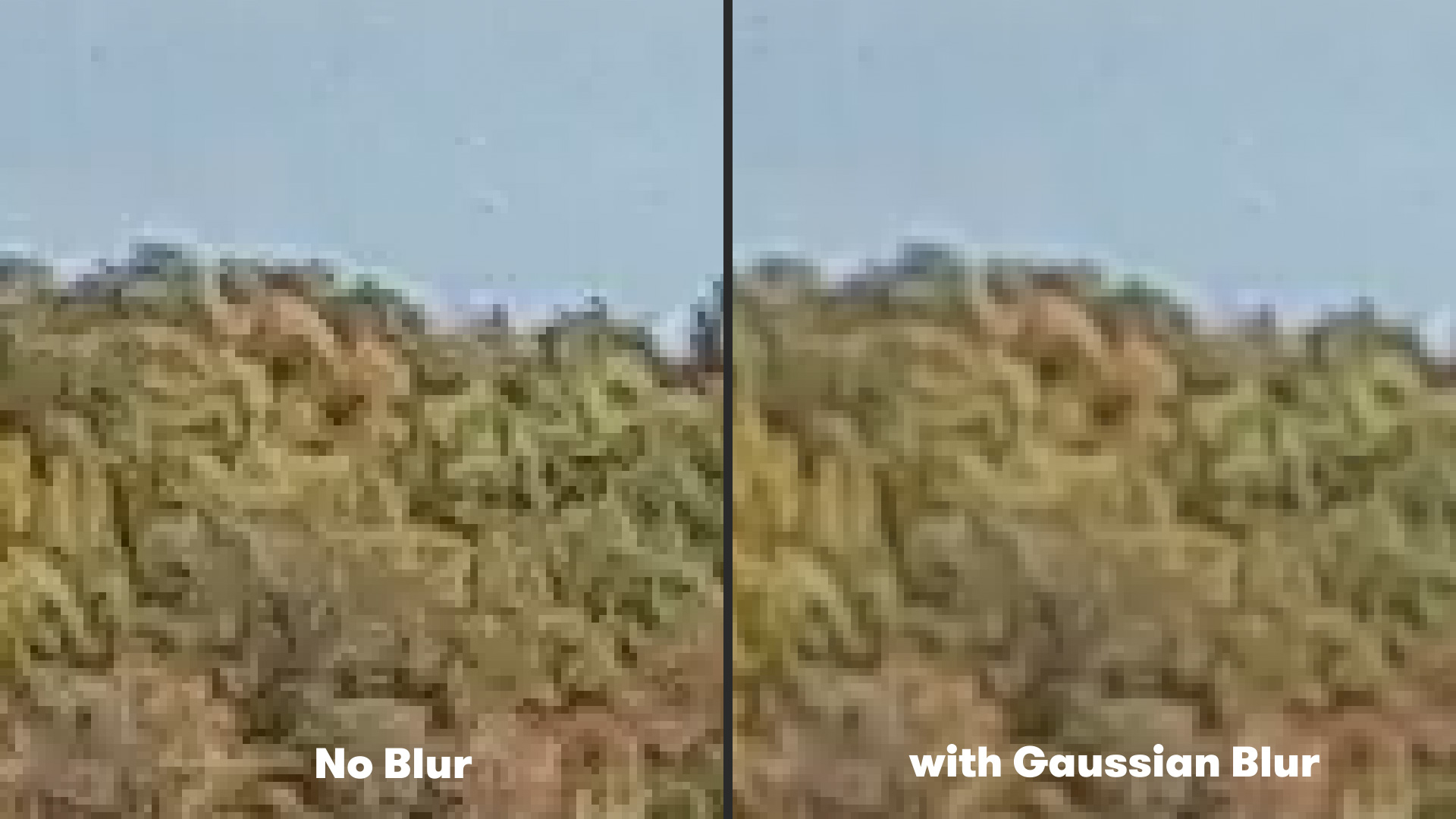
- The Limitation: The primary failure of this method is its lack of discrimination. Gaussian blur is a "dumb" effect; it treats the entire frame the same way. While it successfully hides the aliasing, it also sacrifices the fine detail in areas that don’t need blurring, such as textures on skin, fabric, or distant foliage. This often leaves the footage looking muddy or "out of focus" rather than clean and sharp.
The Modern Paradigm: Edge-Aware Processing
As computing power has increased, the industry has shifted toward intelligent, edge-aware algorithms. Rather than blurring the entire image, modern tools scan the frame to identify high-contrast transitions. By applying a blur only to those specific "stair-stepped" edges, the software can eliminate the flickering while preserving the clarity of the rest of the image. This is the logic behind Fast Approximate Anti-Aliasing (FXAA).
Supporting Data: Why Small Sensors Struggle
To understand why this is a systemic issue, we must look at the hardware. Most action cameras use sensors that are roughly 1/2.3 inches or 1/1.7 inches. To pack 4K or 5.3K resolution into such a tiny space, the individual pixels (photosites) must be incredibly small.
Small pixels have a limited dynamic range and struggle with "pixel binning" and line skipping. When the camera processor takes this raw data and applies a sharpening filter, it creates a feedback loop:
- High-Frequency Detail: The sensor struggles to resolve fine lines.
- Internal Sharpening: The camera’s firmware overcompensates to increase perceived detail.
- Resulting Aliasing: The sharpening filter highlights the errors caused by the sensor’s inability to resolve the line, resulting in the jagged, "shimmering" edges often seen in drone or action footage.
Furthermore, these cameras utilize high-compression codecs (like H.264 or H.265) to keep file sizes manageable. Compression artifacts—specifically macro-blocking—often intersect with aliasing, creating a "crawling" effect that is notoriously difficult to color grade or stabilize without further degrading the image.
Official Responses and Technological Implementation: The FXAA Plugin
The "Plugin Everything" suite has emerged as a professional-grade, free solution for After Effects users looking to bridge this gap. The FXAA (Fast Approximate Anti-Aliasing) plugin is a powerful, lightweight tool that brings gaming-industry technology into the world of video editing.
How to Use FXAA in After Effects
The implementation is designed to be as non-destructive as possible:
- Import Footage: Bring your action camera clip into an After Effects composition.
- Navigate to Effects: Select your layer and go to Effect > Plugin Everything > FXAA.
- Apply and Stack: Unlike a global Gaussian blur, the FXAA algorithm detects the edges automatically. If the aliasing is particularly severe—common in low-bitrate footage—you can stack multiple instances of the effect to increase the intensity of the smoothing without destroying the overall sharpness of the shot.
This plugin is significantly more efficient than standard blur effects because it is optimized for high-speed rendering. In a professional workflow, where time is of the essence, the ability to fix an entire sequence of footage without waiting for hours of render time is a substantial operational advantage.
Implications for Content Creators and Filmmakers
The existence of these tools shifts the burden of quality from the camera manufacturer to the editor. For the filmmaker, the implications are three-fold:
1. The Death of "Over-Sharpening" Anxiety
In the past, filmmakers would often go into their camera settings and manually turn sharpness to "Low" or "Flat" to avoid these artifacts. While this is still a recommended best practice, having a robust post-production recovery tool like FXAA provides a safety net. You can capture the shot with the settings you prefer, knowing that you have the tools to polish the edges in post.
2. Standardizing "Prosumer" Footage
As the lines between professional cinema cameras and action cameras continue to blur, the ability to clean up footage becomes a hallmark of the professional editor. Aliasing is often a "tell" that footage was shot on a consumer device. By removing these artifacts, creators can achieve a more "cinematic" look that is harder to distinguish from high-end gear.
3. Workflow Efficiency
The speed at which FXAA renders means that creators no longer need to choose between quality and delivery time. In the fast-paced world of social media, where high-quality content is expected to be uploaded shortly after filming, a plugin that saves hours of manual masking or heavy processing is a massive asset.
Final Thoughts: Improving Your Action Workflow
While anti-aliasing is a critical step, it is only one piece of the puzzle. To truly maximize the potential of action camera footage, filmmakers should adopt a comprehensive post-production workflow:
- Stabilization: Use tools like ReelSteady GO or DaVinci Resolve’s built-in stabilization to eliminate micro-jitters, which can exacerbate the appearance of aliasing.
- Color Grading: Proper exposure and contrast management can prevent aliasing from being highlighted by aggressive color adjustments.
- Noise Reduction: Use plugins like Neat Video or DaVinci’s Temporal Noise Reduction in conjunction with anti-aliasing to create a clean, professional aesthetic.
By mastering the interplay between your camera’s raw settings and your post-production software, you can turn even the most compact, affordable action camera into a powerful tool for professional-grade storytelling. Whether you are filming extreme sports, high-altitude drone shots, or fast-paced vlogs, the key is to understand the limitations of the technology and apply the right digital corrections to ensure your audience sees the action, not the artifacts.
