
Streamlining the Edit Suite: How DeckBridge is Transforming DaVinci Resolve Workflows
For professional editors, colorists, and sound designers, the transition between the various "pages" of Blackmagic Design’s DaVinci Resolve is more than just a software necessity—it is a cognitive shift. Moving from the high-speed assembly of the Edit page to the meticulous precision of the Color tab and finally to the granular audio balancing of Fairlight requires a constant reconfiguration of mental maps.
The Elgato Stream Deck has long been the industry standard for bridging the gap between hardware and software, offering a tactile interface that replaces cumbersome mouse-clicking with instant, visual feedback. However, until now, integrating the Stream Deck with DaVinci Resolve often required tedious, manual macro programming that lacked true bi-directional communication. Enter DeckBridge, a sophisticated new plugin that promises to turn the Stream Deck into a native control surface for Resolve, effectively bridging the distance between the user’s fingertips and the software’s engine.
Main Facts: The Power of 491 Commands
At its core, DeckBridge is a comprehensive plugin designed for the Elgato Stream Deck ecosystem. Unlike generic macro triggers, DeckBridge offers a library of 491 distinct DaVinci Resolve commands. This is not merely a collection of shortcut triggers; it is a deep integration that allows for a "smart" interface.
Key features of the integration include:
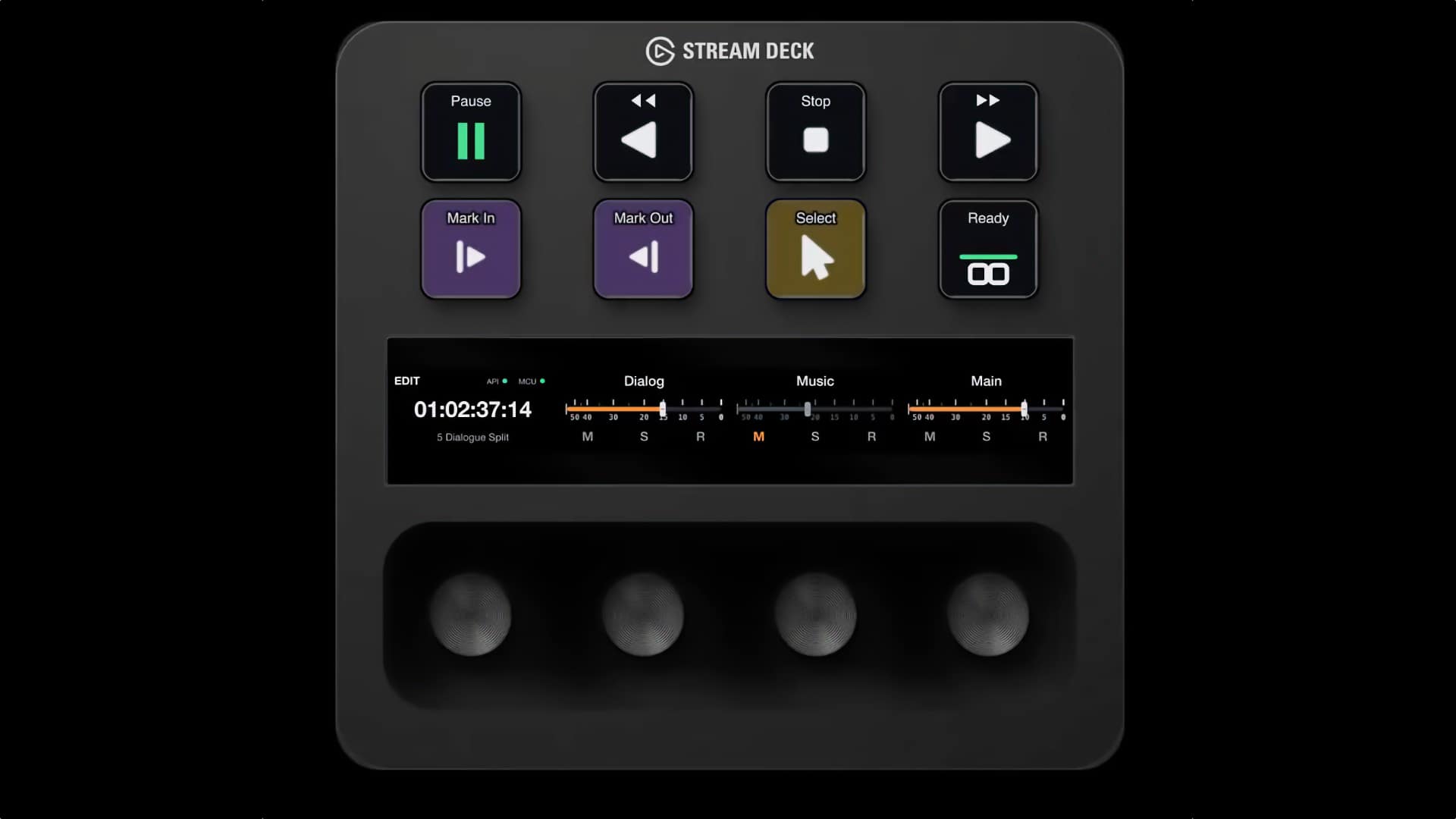
- Live Feedback: Keys do not just perform actions; they light up to reflect the actual playback state of the timeline.
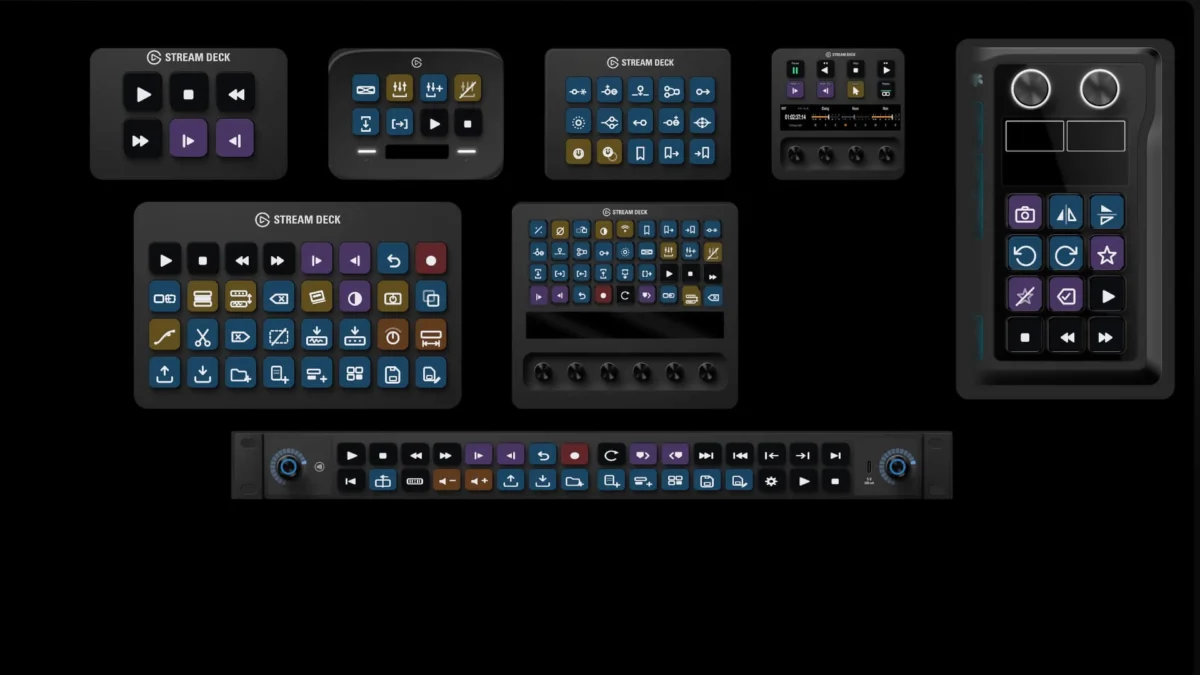
- Adaptive Layouts: As the user switches between Resolve’s pages—Edit, Color, or Fairlight—the Stream Deck automatically morphs its layout to display the most relevant tools for that specific environment.
- Keybinding Synchronization: The plugin intelligently relabels keys to match the user’s custom keyboard bindings, ensuring that if you have modified your Resolve shortcuts, your Stream Deck follows suit.
- Hardware Versatility: The system is built for a wide range of Elgato hardware, including the Stream Deck +, MK.2, XL, Mini, Neo, and the specialized Studio and Galleon 100 SD models.
By utilizing color-coding schemes—Transport, Modal tools, Edits & navigation, Value controls, Marks & metadata, and Record—DeckBridge uses a 14% wash of the native Resolve interface colors, creating a cohesive visual language that makes the hardware feel like a natural extension of the software.
Chronology: The Evolution of Edit Control
The history of video editing is a history of the "interface barrier." In the analog era, editors had physical jog wheels, shuttle knobs, and physical buttons that provided haptic confirmation of every cut. As editing moved to non-linear systems (NLEs), that tactility was largely sacrificed for the efficiency of the keyboard and mouse.
Over the last decade, we have seen a "tactile renaissance." The introduction of the DaVinci Resolve Speed Editor was a landmark moment, proving that editors craved specialized hardware. However, the Speed Editor is a locked-down device. The Stream Deck, conversely, is an open-ended canvas.
DeckBridge emerges as the latest chapter in this evolution. Its development represents a shift from "generic macro pads" to "context-aware control surfaces." By bypassing the need for users to spend dozens of hours mapping their own keys, the creators of DeckBridge have effectively commoditized professional-grade hardware integration. Following a period of rigorous testing and development, the plugin was recently released on the Elgato Marketplace, marking the first time such an extensive, pre-configured library of Resolve commands has been made available to the general public in a plug-and-play format.
Supporting Data: Compatibility and Integration
One of the most impressive aspects of DeckBridge is its technical flexibility. Often, software plugins struggle to maintain compatibility across different versions of NLEs. DeckBridge, however, supports DaVinci Resolve versions 19 through 21, catering to both the Free and Studio tiers.
The "Bridge" Architecture
The plugin employs a dual-method approach to ensure functionality regardless of the Resolve version:
- Bundled Bridge: For users on Resolve 21.0 and earlier, a bundled bridge manages the heavy lifting of communication between the plugin and the software.
- Accessibility Reader: For users on Resolve 21.1 and later, the plugin utilizes an accessibility reader to interpret state data. This allows for real-time updates without the overhead of older, legacy protocols.
While the Free edition of Resolve is fully supported, the developers recommend the Studio version for power users. The Studio license unlocks advanced features like live timecode display and real track name retrieval, which are essential for high-end post-production environments where identifying audio channels at a glance is a prerequisite for speed.
Installation and Setup
Ease of use is clearly a priority for the DeckBridge team. The setup process is designed to be non-intrusive. A guided setup wizard manages the complex MIDI configurations, and—crucially—the software automatically backs up any existing MIDI settings before making modifications. This "safety-first" approach is a welcome relief for professionals who cannot afford to have their primary edit suites break due to a configuration conflict.
Official Responses and Developer Philosophy
The developers behind DeckBridge have emphasized that their goal was to solve a problem they experienced themselves: the "context-switching fatigue" inherent in modern video editing. By creating an interface that "listens" to the software, they’ve managed to create a system that feels less like a controller and more like a dashboard.
In their communications, the team highlights the importance of visual clarity. "We wanted the deck to feel like an extension of the Resolve interface," one developer noted. "By using the same color palette as Resolve, we reduce the time it takes for the editor’s eye to move from the monitor to the deck and back."
The recent expansion into the DeckBridge for Cursor project, currently in private beta for macOS, suggests that the developers are looking to apply this same philosophy to AI-assisted coding environments. This indicates a long-term commitment to enhancing productivity through hardware-software synergy, positioning the brand as a leader in the "workflow automation" space.
Implications: The Future of the Edit Suite
What does the widespread adoption of tools like DeckBridge mean for the industry?
1. The Democratization of Professional Workflows
Previously, achieving a highly customized, hardware-integrated workflow was the domain of boutique post-production houses with the budget to hire dedicated systems engineers. DeckBridge brings this level of control to the solo creator. For a flat fee of £54.99, a freelancer can replicate a workflow that previously required thousands of dollars in proprietary hardware and custom scripting.
2. Reduced Cognitive Load
The cognitive load of editing is often underestimated. Between managing codecs, color grades, and audio levels, the editor’s brain is constantly taxed. By offloading navigation, tool selection, and playback control to the DeckBridge-enabled Stream Deck, editors can keep their focus on the creative decisions rather than the software interface. The "morphing" keys—which change as you switch from the Color page to the Edit page—ensure that the user is always presented with the tools they need, when they need them.
3. The Shift to "Always-On" Feedback
The most profound implication is the shift from "static" controllers to "dynamic" ones. A button that tells you what color grade you are currently applying, or a dial that shows you the exact timecode of your playhead, changes the nature of the editing experience. It moves the user from a state of "triggering actions" to "monitoring states." This is the hallmark of professional-grade control surfaces, and its integration into the consumer-friendly Stream Deck is a significant milestone.
4. Setting a New Standard for Third-Party Plugins
DeckBridge sets a high bar for future plugin developers. It demonstrates that users are willing to pay for polish, reliability, and deep integration. We can expect to see a ripple effect in the marketplace, with other developers likely pushing for similar levels of "bi-directional" communication between hardware and creative software.
Conclusion: A Worthwhile Investment
For those who live inside DaVinci Resolve, DeckBridge is more than just a convenience; it is a fundamental upgrade to the editing environment. By combining an expansive library of 491 commands with the tactile feedback of the Elgato Stream Deck, the plugin solves one of the most persistent issues in post-production: the friction between intention and execution.
Whether you are a professional colorist working on a feature film or a content creator managing a complex YouTube timeline, the ability to have your tools relabel and reconfigure in real-time is a game-changer. As the line between hardware and software continues to blur, DeckBridge stands out as a prime example of how thoughtful, well-engineered solutions can make the most complex software feel intuitive, responsive, and, above all, powerful.
With its simple, one-click installation and a clear commitment to supporting both the Free and Studio versions of DaVinci Resolve, DeckBridge is poised to become a staple in the modern edit suite. The future of editing isn’t just about faster processors or better cameras—it’s about the seamless connection between the human creative mind and the digital canvas. DeckBridge is a major step toward that future.
