
Blackmagic Design Releases DaVinci Resolve 21.0.4: Focus on Workflow Stability, Proxy Flexibility, and Sony FX5 X-OCN Integration
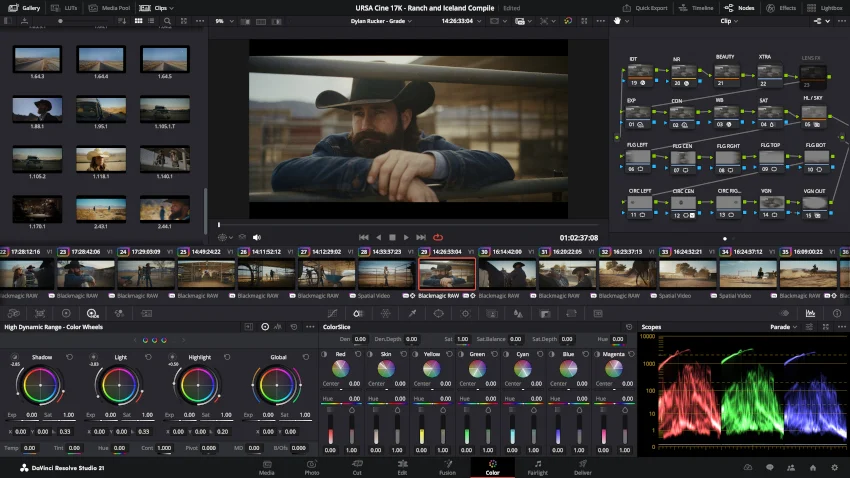
Blackmagic Design has officially released DaVinci Resolve 21.0.4, continuing its ongoing post-21.0 refinement cycle. While major software updates often grab industry headlines with flashy, consumer-facing creative tools and AI-driven capabilities, this latest point release takes a different approach. Version 21.0.4 is built entirely around structural integrity, infrastructural updates, and quality-of-life enhancements designed to ease the friction points in demanding, multi-format post-production pipelines.
Spanning updates across media management, the Cut and Edit pages, the Color page, scripting APIs, and playback engines, this update targets the everyday bottlenecks editors, colorists, and assistant editors face on tight deadlines. Among the most notable updates are advanced proxy relinking capabilities, native support for Sony FX5 X-OCN camera codecs, expanded programmatic control via the scripting API, and substantial playback stability fixes for large, heavily cached timelines.
Main Facts: What’s New in DaVinci Resolve 21.0.4?
The 21.0.4 maintenance update introduces several core enhancements aimed at professional workflows:
- Flexible Proxy Relinking: Users can now relink proxy media generated in different formats, removing the strict format-matching constraints previously enforced during offline-to-online transitions.
- Sony FX5 X-OCN Native Support: The update introduces direct compatibility for Sony FX5 X-OCN clips, integrating high-end RAW acquisition workflows straight into the Resolve interface.
- Expanded Scripting API: Developers and technical directors gain deeper programmatic access, including timeline clip selection retrieval, timeline object extraction from Media Pool entries, and advanced
SetRenderSettingscontrols for handles, extents, and data burn-ins. - Large Cache Playback Stability: Realtime playback issues on complex, heavily cached timelines have been addressed to ensure smoother visual reviews.
- Editing and Color Page Tweaks: DRT imports now automatically relink to existing nested clips, and the Color page preserves user clip selections dynamically when changing clip filters.
- Expanded Format Decoding: Resolves decoding bugs affecting specific DPX sequences, Canon CR2 raw still images, and Windows-based H.264 software decoding, alongside the addition of legacy Affinity file format importing (excluding Linux environments).
Chronology and Development Context
To understand the positioning of DaVinci Resolve 21.0.4, it helps to examine the trajectory of Blackmagic Design’s software rollout strategy. Following the major enterprise and creative feature drops embedded in the initial DaVinci Resolve 21 rollout, the subsequent 21.0.x maintenance iterations have shifted strictly toward stability, user feedback integration, and bug resolution.
- Initial DaVinci Resolve 21 Release: Introduced foundational toolsets, expanded spatial audio and color management protocols, and laid the groundwork for the version 21 lifecycle.
- Early 21.0.x Patches: Focused on plugging immediate memory leaks, stabilizing early OS compatibility (macOS Sequoia, Windows 11 updates, and various Linux distributions), and resolving isolated crash reports.
- DaVinci Resolve 21.0.4 (Current Release): Marks a mature pivot toward systemic workflow efficiency. Rather than rushing out new user-facing gimmicks, Blackmagic’s engineers spent this cycle resolving long-standing assistant editor complaints—such as rigid proxy requirements—and responding to the rapid adoption of new cinema camera codecs like Sony’s X-OCN format on the FX5 platform.
Supporting Data and Deep-Dive Analysis
A closer examination of the individual feature additions reveals how significantly these changes impact high-end television, commercial, and independent feature film workflows.
1. Breaking the Constraints of Proxy Relinking
In traditional post-production pipelines, transitioning from a lightweight offline proxy workflow to an uncompressed online finishing workflow requires absolute structural discipline. Previously, if proxies were generated using mixed formats or variable bitrates over the span of a chaotic, multi-camera shoot, DaVinci Resolve’s relinking engine could throw errors or fail to map assets correctly.
With version 21.0.4, Resolve makes its Relink Clips workflow significantly more forgiving. By allowing editors to relink proxy media even when the proxy files utilize different formats, the software accommodates messy, real-world ingest scenarios. Whether a production relied on a combination of ProRes Proxy, DNxHR LB, and lightweight H.264 files generated across different field stations, Resolve can now cleanly stitch the online masters back to their respective offline placeholders.
2. Sony FX5 X-OCN Integration
Sony’s expansion of its X-OCN (Extended Camera Original) recording formats down into more accessible cinema camera bodies like the FX5 has democratized access to lightweight, mathematically lossless RAW workflows. However, leveraging these sophisticated codecs has historically required robust native decoding pipelines.
DaVinci Resolve 21.0.4 introduces official, native support for Sony FX5 X-OCN clips. This eliminates the need for cumbersome intermediary transcoding steps, allowing cinematographers and DITs to ingest camera cards straight onto the data cart and push them directly into the Resolve timeline. Colorists benefit immediately from full access to the sensor’s native color science, metadata, and dynamic range without incurring the performance penalties of third-party wrappers or unstable software plugins.

3. Advanced Scripting API Capabilities for Automated Pipelines
Studio facilities, boutique post houses, and automated cloud workflows rely heavily on DaVinci Resolve’s Python and Lua scripting APIs to orchestrate rendering, media movement, and quality control checks. Version 21.0.4 broadens this automation surface area substantially:
- Timeline Clip Selection Retrieval: Scripts can now programmatically query which clips are currently highlighted on an active timeline, allowing automated QC tools or review scripts to target specific edits.
- Media Pool to Timeline Object Mapping: Developers can easily grab a timeline object directly from a Media Pool entry via script, streamlining project setup automation.
- Enhanced Render Settings: The
SetRenderSettingsAPI has been supercharged with granular controls for handles, extents, and visual data burn-ins.
While advanced scripting integration remains a staple of DaVinci Resolve Studio, basic console-level scripting continues to be accessible in the free version, ensuring independent developers can prototype automation scripts before deploying them at scale.
4. Clearing the Bottlenecks: Playback, Caching, and Decoding
For editors working on feature-length narratives or complex visual effects sequences, timeline stutter is a productivity killer. Version 21.0.4 targets real-time playback errors on large, heavily cached timelines. By optimizing how Resolve manages and flushes cached render files during intense timeline scrubbing, Blackmagic has restored smooth playback performance to resource-heavy sequences.
Additionally, background decoding fixes address nagging issues that have plagued archival and mixed-asset projects:
- DPX File Integrity: Fixed rendering and playback artifacts associated with certain non-standard DPX sequence headers.
- CR2 Still Images: Resolved loading and interpretation errors for legacy Canon raw still images embedded in documentary and hybrid photo-video projects.
- Windows H.264 Software Decoding: Addressed stability bugs tied to software-based H.264 decoding pipelines on Windows operating systems, cutting down on unexpected crashes when dealing with consumer-grade reference footage.
- Legacy Affinity Files: Introduced support for importing legacy Affinity design files (note: excluded on Linux platforms), easing the handoff between graphic design assets and motion graphics/editorial pipelines.
Official Responses and Community Reception
The release of DaVinci Resolve 21.0.4 has been met with quiet appreciation across professional forums, Reddit’s r/davinciresolve, and the Blackmagic Design official community boards.
Unlike major version upgrades that spark intense debates over user interface redesigns or new AI features, maintenance patches like 21.0.4 are viewed by working professionals as essential tune-ups. Assistant editors and online conform artists, in particular, have voiced strong approval for the relaxed proxy relinking rules. On community channels, lead workflow technicians noted that the ability to bypass rigid proxy format matching saves hours of manual re-conforming on multi-vendor documentary projects.
Blackmagic Design continues to provide comprehensive support for the update via its active user forums, where technical support teams actively monitor bug reports related to the new codec implementations and scripting APIs.
Implications for the Post-Production Industry
The continuous refinement strategy exhibited in DaVinci Resolve 21.0.4 highlights a broader shift in the post-production software market. As editing suites transition deeper into cloud-based collaboration, remote editing, and hybrid local-remote pipelines, software stability and metadata integrity matter far more than superficial feature bloat.
By quietly optimizing proxy workflows, expanding native camera compatibility for industry-standard tools like the Sony FX5, and giving programmatic pipelines deeper hooks into timeline objects, Blackmagic Design is cementing DaVinci Resolve’s dominance not just as a color grading suite, but as an all-in-one post-production powerhouse. For post-production supervisors, facility engineers, and freelance editors operating in the trenches of modern media creation, updates like 21.0.4 ensure that the tools work invisibly, efficiently, and reliably under pressure.
