
Taming the Archive: How DriveShelf Solves the Modern Filmmaker’s Offline Storage Crisis
Main Facts: The Anatomy of a Physical Storage Bottleneck
In the modern digital workflow, the lifecycle of video production does not end when the final render is exported. For independent filmmakers, cinematographers, directors, and boutique post-production houses, the conclusion of a project marks the beginning of an entirely different operational hurdle: long-term physical storage management.
As camera resolutions scale upward—routinely capturing 4K, 6K, and 8K footage in heavy raw formats—the volume of data generated by a single production can quickly swell to several terabytes. Once a project wraps, active editing bays are inevitably cleared, and the raw camera originals, project files, sound mixes, and proxy exports are systematically transferred to an ever-expanding fleet of external solid-state drives (SSDs) and mechanical hard drives. These devices are then labeled, filed, and placed onto physical shelves, where they sit indefinitely.
While acquiring high-capacity storage has become progressively cheaper, overcoming the physical and cognitive limits of human memory has not. Months or even years down the line, when a client requests a revision, a retrospective featurette, or archival assets for a new pitch, the hardest part of the job is rarely transferring the data; it is remembering which specific drive holds the required files.
Enter DriveShelf, a streamlined macOS utility developed by Bangkok-based director and cinematographer Sergiy Pudich. Designed specifically to bridge the gap between active editing systems and dormant offline archives, DriveShelf introduces a frictionless approach to a universal pain point. Instead of forcing filmmakers to engage in the tedious, time-consuming trial-and-error process of plugging in drives one by one to search for missing media, DriveShelf indexes physical media upon connection, building a lightweight, searchable local catalog. Once a drive is indexed, it can be safely disconnected and returned to its shelf, while its entire file structure—ranging from filenames and folder paths to file sizes and dates—remains fully searchable within the application.
Pudich originally conceived the utility out of personal necessity, grappling with his own escalating collection of production drives before refining it into a commercial product via his platform, Easyfilm. Available as a one-time purchase on the Mac App Store for $14.99 with no recurring subscription fees, DriveShelf targets a very specific, highly relatable niche: transforming a chaotic wall of unmarked media into a digitally searchable database without demanding an expensive, enterprise-grade Media Asset Management (MAM) ecosystem.
Chronology: The Evolution of DriveShelf and Modern Offline Indexing
To understand how DriveShelf fits into the contemporary post-production landscape, it is helpful to trace its development from a bespoke developer’s script to a polished utility equipped with cross-platform synchronization and granular inventory tools.
The Genesis of a Creator’s Tool
Long before DriveShelf became a public application, creator Sergiy Pudich faced a logistical bottleneck familiar to anyone working extensively in remote or on-location video production. Over years of shooting commercial spots, documentaries, and narrative projects, his studio accumulated dozens of external SSDs. Finding a misplaced audio stem or a specific take from an obscure 2018 shoot meant devoting hours to a mechanical ritual: unboxing drives, tethering them to a workstation via USB-C or Thunderbolt hubs, waiting for macOS Spotlight to index them (or failing to index them properly), and manually navigating through deeply nested folder hierarchies.
Recognizing that existing tools—ranging from complex enterprise DAMs to bloated cataloging software—were either too expensive, too cumbersome, or poorly optimized for the nimble workflows of independent creators, Pudich engineered a lightweight utility focused exclusively on rapid, metadata-driven offline discovery.
Version 1.9 and the Integration of Local Workstations
As DriveShelf transitioned from a beta concept to a commercial release, user feedback dictated a rapid iteration cycle. A major milestone in the software’s evolution arrived with Version 1.9, which introduced the "Add This Mac" feature.
Prior to this update, DriveShelf was strictly confined to external media. However, modern editing workflows are rarely so black-and-white; active project assets, scratch disks, and current working directories often reside on the internal storage of a MacBook Pro or Mac Studio while older material is offloaded to external enclosures. Version 1.9 bridged this operational divide by allowing users to index their Mac’s internal Home folder alongside their disconnected archival drives. Consequently, the workstation itself appears as a distinct, searchable entry within the application’s unified catalog, allowing creators to query both active local directories and dead-storage shelves from a single interface.
The Arrival of the iOS Companion
The most recent chapter in DriveShelf’s chronology involves mobile integration. Recognizing that filmmakers are rarely tethered to their editing desks when production queries arise, the developer introduced an iPhone companion app included with the base desktop purchase. By leveraging Apple’s secure iCloud infrastructure to synchronize catalogs silently in the background, DriveShelf expanded its reach from the studio desk to the palm of the user’s hand, ensuring that an archive’s contents remain accessible on location, in transit, or during client meetings.
Supporting Data: Under the Hood of DriveShelf
DriveShelf’s utility lies in its minimalist, purposeful feature set. Rather than attempting to act as an all-in-one ingest engine, transcoding suite, or automated backup utility, the software deliberately narrows its scope to indexing, searching, and managing physical storage metadata.
Granular Cataloging and Hardware Recognition
When an external drive is connected to a host Mac running DriveShelf, the application ingests the drive’s structural DNA. It records filenames, exact folder paths, individual file sizes, and creation or modification dates. Crucially, the software identifies storage devices using their immutable hardware UUID (Universally Unique Identifier) rather than their user-assigned volume names. This technical distinction is vital for production environments: if a cinematographer renames an SSD from "Shoot_A_Backup" to "Client_Project_Final," DriveShelf will not lose track of the device or require a re-index. The catalog remains continuously synchronized with the physical hardware’s underlying identity.
Once indexed, users can browse their offline assets using a familiar, Finder-style column view that mirrors the directory structure of the disconnected drive. Alternatively, robust filtering tools allow operators to narrow down search results based on specific parameters, including file types, size thresholds, designated drives, or custom user-defined drive groups.
Organization and Metadata Tagging
To combat the cognitive fatigue of managing dozens—or even hundreds—of physical volumes, DriveShelf incorporates flexible organizational frameworks:
- Drive Grouping: Users can bundle drives into logical categories based on project titles, client names, calendar years, or geographic shoot locations.
- Custom Notes: Operators can attach detailed text notes directly to individual storage devices within the app, providing a digital scratchpad for physical caveats (e.g., "Drive connector slightly loose; contains alternate audio poly-wavs").
- Drive Health and Diagnostics: Beyond simple searching, the utility includes built-in drive speed testing tools and real-time volume capacity monitors, giving creators a quick snapshot of how much free space remains on active drives before they are retired to the shelf.
Cross-Drive Duplicate Detection
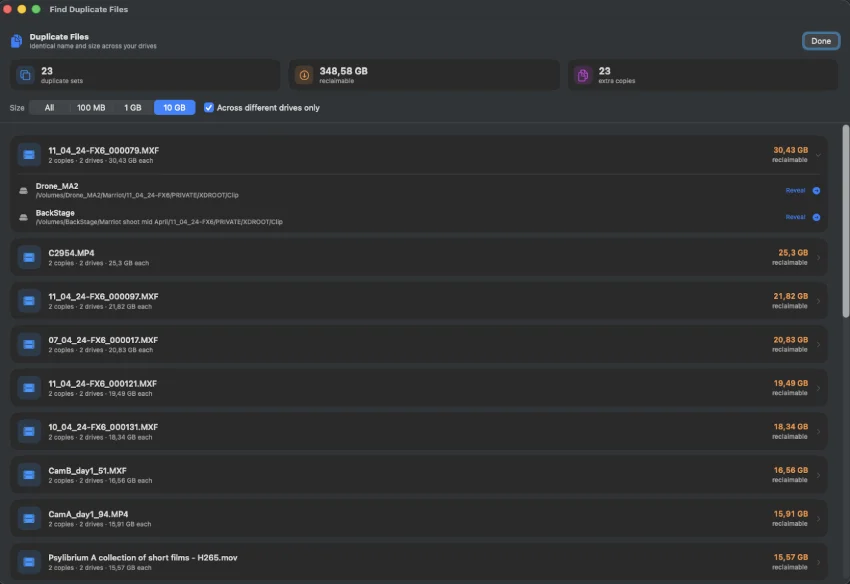
One of DriveShelf’s most pragmatic data-management features is its cross-drive duplicate finder. As projects evolve, duplicate assets frequently multiply across different backups—scratch elements, duplicated proxy folders, and redundant exports are often saved across multiple generations of drives. DriveShelf can scan across all cataloged devices to identify files sharing identical names and byte sizes.

It is worth noting the technical parameters of this feature: DriveShelf detects duplicates based on deterministic attributes (filename and file size) rather than cryptographic hashing (such as MD5 or SHA-256 checksums). Therefore, the application flags these instances as potential duplicates rather than verified byte-for-byte twins. Nevertheless, for an independent creator staring down terabytes of redundant camera originals, this surface-level overview provides a vital roadmap for storage reclamation before purchasing additional hardware.
Mobile Sync and Privacy Architecture
The iPhone companion application relies on the user’s personal iCloud account to synchronize the local catalog generated by the Mac. This design choice maintains a strict privacy boundary: DriveShelf does not upload user catalogs to third-party proprietary servers. All primary data processing, scanning, and indexing occur locally on the Mac, ensuring that sensitive production manifests, client project structures, and unreleased intellectual property remain entirely under the control of the filmmaker.
Official Responses and Developer Philosophy
The reception of DriveShelf within the independent film community highlights a broader shift in creator-centric software development: small, highly targeted utilities built by practitioners are increasingly outcompeting monolithic, generalized software suites.
Sergiy Pudich has been vocal about the design philosophy underpinning DriveShelf, emphasizing what the software deliberately avoids doing just as much as what it achieves. In technical documentation and creator community discussions, Pudich has repeatedly stressed that DriveShelf is not a backup solution.
"DriveShelf is designed to solve a very specific behavioral problem: remembering where a file lives once the drive is unplugged," notes the development philosophy behind Easyfilm.io. "It does not protect your files against hardware failure. It does not create RAID arrays, it does not execute automated background backups, and it cannot recover data from a corrupted sector. A professional 3-2-1 backup strategy remains non-negotiable for valuable camera originals."
Furthermore, Pudich has addressed the limitations regarding network-attached storage (NAS) and enterprise server environments. Because DriveShelf is engineered specifically around local macOS file systems and removable external media (USB, Thunderbolt, and internal SSDs), native support for network-mounted volumes or proprietary cloud storage buckets is intentionally omitted from the current roadmap. This focused boundary ensures that the application remains lightning-fast, lightweight, and entirely independent of complex network latency or database bottlenecks.
Implications: The Future of Independent Post-Production Workflows
The introduction and steady refinement of utilities like DriveShelf carry profound implications for the economics and operational efficiency of modern video production.
The Democratization of Asset Tracking
Historically, comprehensive Media Asset Management (MAM) systems were the exclusive domain of Hollywood post-production facilities, broadcast networks, and high-end commercial advertising agencies capable of deploying expensive server infrastructure and dedicated assistant editors. Independent filmmakers, corporate videographers, and small-scale documentary crews were largely left to manage their offline archives through makeshift methods: chaotic Excel spreadsheets, color-coded sticky notes slapped onto drive enclosures, or memory alone.
By packaging robust metadata indexing, cross-device searching, and mobile synchronization into a $14.99 one-time purchase, DriveShelf democratizes professional-grade archive visibility. An independent documentarian working out of a home office can now manage a physical shelf of fifty external SSDs with the same systemic precision previously reserved for enterprise production houses.
Mitigating Client Friction on Location
In client-facing production environments, turnaround time is currency. If a director is on location or in a boardroom meeting and a producer casually asks, "Do we still have the raw B-roll footage from that corporate rebranding campaign we shot two years ago?" the traditional response involves awkward delays: guessing which drive it might be on, messaging an assistant editor back at the studio, or waiting until the end of the working day to run manual searches.
DriveShelf’s iOS integration entirely eliminates this friction. By querying the synchronized catalog via an iPhone, a creator can instantly pinpoint the exact drive name, folder path, and file status in seconds. This responsiveness transforms an abstract administrative delay into an immediate, professional answer, elevating client confidence and reducing operational friction.
Sustainability in the Face of Data Inflation
As the film industry marches inexorably toward higher resolutions, immersive capture formats, and higher frame rates, the physical footprint of digital media will only continue to expand. While cloud storage offers an alternative for some, the recurring subscription costs, bandwidth limitations, and security concerns associated with uploading multi-terabyte cinematic archives make physical, localized cold storage an enduring reality for the vast majority of creators.
Tools that simplify the management of physical media prolong the viability of local, offline archiving. By removing the anxiety and friction associated with hunting for lost files, utilities like DriveShelf ensure that independent creators can continue to archive economically, utilizing affordable physical hard drives and SSDs without sacrificing their ability to retrieve legacy assets when inspiration—or a lucrative licensing opportunity—strikes anew.
Pricing and System Requirements
DriveShelf is available exclusively through the Mac App Store under a straightforward, perpetual licensing model:
- Price: $14.99 USD (with localized regional pricing applied globally).
- Subscription Status: Zero recurring subscription fees or hidden in-app paywalls; all future minor updates and the included iPhone companion app are tied to the initial purchase.
- Mac System Requirements: Requires macOS 14.0 or later and provides native, optimized performance for both Apple Silicon (M-series) and Intel-based Macintosh architectures.
- iOS System Requirements: The iPhone companion application requires iOS 26.5 or later and an active personal iCloud account for secure, encrypted local catalog synchronization.
For independent creators whose time is measured in billable editing hours, the modest financial investment is easily offset by the elimination of storage-hunting delays. DriveShelf proves that solving complex digital workflow problems does not always require bloated, subscription-heavy enterprise software; sometimes, all it takes is a clever utility built by a filmmaker, for filmmakers.
