
The Digital Nostalgia Renaissance: Mastering the Mini DV Aesthetic in After Effects

The cyclical nature of aesthetic trends has officially turned its gaze toward the late 1990s and early 2000s. Just as the warmth of vinyl records and the magnetic fuzz of VHS tapes found a second life among younger generations, the distinct, gritty charm of Mini DV (Digital Video) has emerged as the latest hallmark of "Lo-Fi" digital cinematography.
For modern creators, this aesthetic isn’t just about technical degradation; it is an exercise in intentional storytelling. By stripping away the clinical perfection of 4K and 8K sensors, filmmakers are reaching for a texture that feels authentic, lived-in, and profoundly nostalgic. This article explores the technical mechanics of recreating this specific retro look within Adobe After Effects, providing a professional roadmap for those looking to emulate the high-contrast, aliased, and color-fringed visuals that defined an era.
The Rise of the Lo-Fi Aesthetic
In an era dominated by high-bitrate, high-dynamic-range imagery, the appeal of Mini DV lies in its imperfections. Originally a consumer-grade format, Mini DV utilized a specific compression algorithm that resulted in blocky artifacts, stair-stepping along edges (aliasing), and a peculiar way of rendering light that feels "harsh" compared to modern digital cinema cameras.
Creative directors and music video producers are increasingly turning to this "digital grain" to ground their projects in a sense of time and place. Unlike the analog warmth of VHS, Mini DV represents the dawn of the digital age—a transitionary period that feels uniquely "internet-native" and culturally significant.

Technical Chronology: How the Look Was Born
To recreate the look, one must first understand the limitations of the original hardware. Between 1995 and the mid-2000s, Mini DV cameras were the standard for home movies, independent documentaries, and early digital art.
- Resolution Constraints: Mini DV recorded at a standard definition resolution (720×480 for NTSC or 720×576 for PAL).
- The Interlacing Factor: These cameras captured movement in fields rather than full frames, leading to the characteristic "combing" artifacts seen during fast motion.
- Sensor Limitations: The small CCD sensors struggled with low light, resulting in high-contrast images where shadows were crushed and highlights were blown out, creating a "punchy" but often muddy image.
- Color Sampling: The color space was compressed, often leading to slight color bleeding or fringing at high-contrast edges.
Modern post-production workflows allow us to simulate these hardware limitations through strategic downscaling and digital effect stacking.
Step-by-Step Implementation in Adobe After Effects
Recreating the Mini DV aesthetic requires a multi-stage approach to "degrade" high-quality modern footage effectively.
Phase 1: Establishing the Foundation
Begin by creating a new composition titled "Mini DV Comp." This composition will serve as your digital "negative."
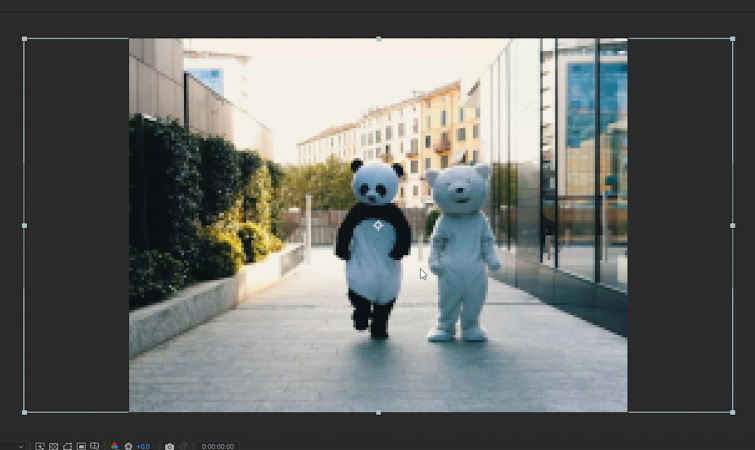
- Aspect Ratio: Set the dimensions to 200px x 150px. This forces a 4:3 aspect ratio, which is essential to the period-accurate look.
- Importing: Drag your high-definition footage into this composition.
- Downscaling: To achieve the authentic pixelation, select your footage and navigate to Layer > Transform > Fit to Comp Height. At this stage, your footage will appear incredibly pixelated. This is the desired outcome. You are essentially forcing a high-resolution file to exist within a low-resolution container, which creates the "digital grit" that serves as the base for the effect.
Phase 2: Upscaling for the Modern Screen
Once the Mini DV Comp is prepared, you must integrate it into your final delivery environment.
- Main Comp: Create a second composition, "Main Comp," set to 1920px x 1080px.
- Integration: Drag the "Mini DV Comp" into the "Main Comp."
- Upscaling: Use the Fit to Comp Height function again to scale the Mini DV Comp up to fill the 1080p canvas. Because you scaled it down first, the pixels will now appear enlarged, creating the classic "aliasing" or "stair-stepping" effect on horizontal lines that is a hallmark of low-res digital capture.
Enhancing the Look: Advanced Texturing
Merely downscaling is not enough to capture the "Mini DV" spirit. You must apply digital artifacts to mimic the characteristics of the hardware sensors of the late 90s.
Color Grading and Contrast
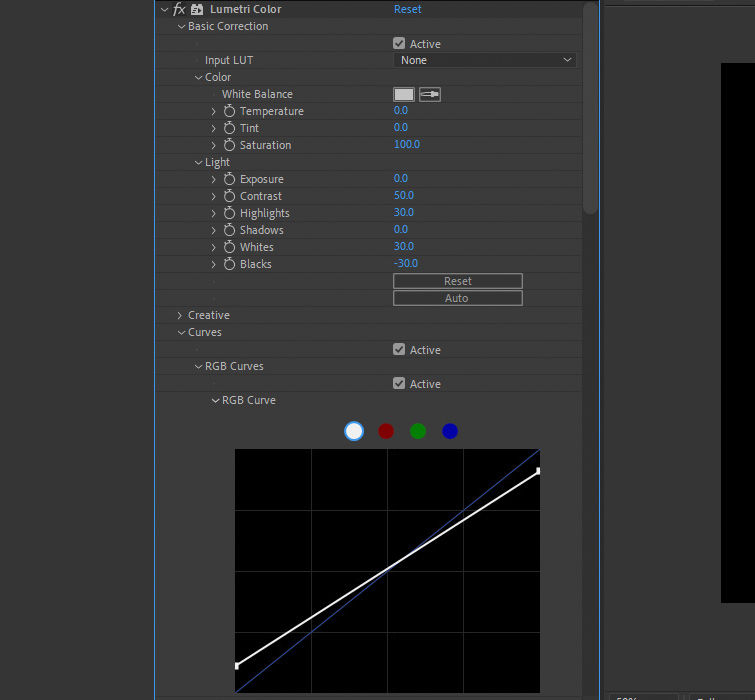
The hallmark of consumer digital cameras from that era was an inability to handle dynamic range gracefully. Use the Lumetri Color effect to push the footage toward a harsher, more aggressive look:
- Contrast: Increase to 50.
- Highlights: Set to 30.
- Whites: Set to 30.
- Blacks: Set to -30.
This creates a high-contrast image where the shadows are deep and the highlights are sharp. For advanced users, adjusting the White and Black points on the RGB Curves can further tighten the dynamic range to mimic the "clipped" look of early digital sensors.

Simulating Color Fringing
Digital sensors often suffered from chromatic aberration, where colors would slightly "bleed" at the edges of objects.
- Apply the Channel Blur effect.
- Set the Blue Blurriness to 3.
This subtle shift adds an immediate sense of vintage digital distortion, tricking the eye into perceiving the footage as being processed through an older, less sophisticated lens/sensor combination.
The Finishing Sharpness
To complete the effect, you need to emphasize the "stair-stepping" artifacts.
- Apply the Unsharp Mask effect.
- Amount: 150.
- Radius: 2.
This will punch up the harsh edges, adding a "halo" effect to lines and shapes. This makes the footage feel less like a high-res video and more like an authentic, low-bitrate capture.
Supporting Data: Why "Lo-Fi" Persists
Market analysis from creative platforms suggests that "Lo-Fi" video assets have seen a 40% increase in search volume over the last three years. The implication is clear: audiences are suffering from "resolution fatigue." In a world of perfectly clean, sharp, and color-corrected social media content, the intentional inclusion of digital noise, aliasing, and retro color palettes acts as a visual "pattern interrupt."
By choosing to use these effects, creators are signaling a departure from the "polished" corporate aesthetic, favoring an intimate, DIY-inspired visual language that resonates with younger, digital-native demographics who associate these looks with a simpler, more experimental era of technology.
Implications for Future Filmmaking
The professional implementation of these techniques in programs like After Effects suggests that "retro" is no longer just a filter applied on a phone app. It has become a sophisticated post-production discipline.
As software continues to improve, the ability to selectively degrade image quality will remain a vital tool in the cinematographer’s kit. Whether you are creating a music video, an experimental short, or a social media ad campaign, the "Mini DV" look provides an immediate emotional connection to a specific time in history.
Final Considerations
- Flexibility: Because this effect is built on a nested composition, you can swap out the source footage at any time without losing your "look." Simply update the "Mini DV Comp," and your settings remain locked in.
- Beyond Mini DV: If you find yourself enjoying the retro workflow, the same logic applies to other formats. Techniques for creating the "VHS look" or "8mm film grain" follow similar patterns of layering, degradation, and color manipulation.
As we move further into the future, the past will continue to provide the aesthetic building blocks for the next generation of visual media. By mastering the art of the "Mini DV" effect, you aren’t just creating a filter—you are curating a mood that feels as real as the technology that inspired it.
