
FilmConvert Expands Color Grading Ecosystem with Dedicated Insta360 Luna Ultra Support for Nitrate and CineMatch
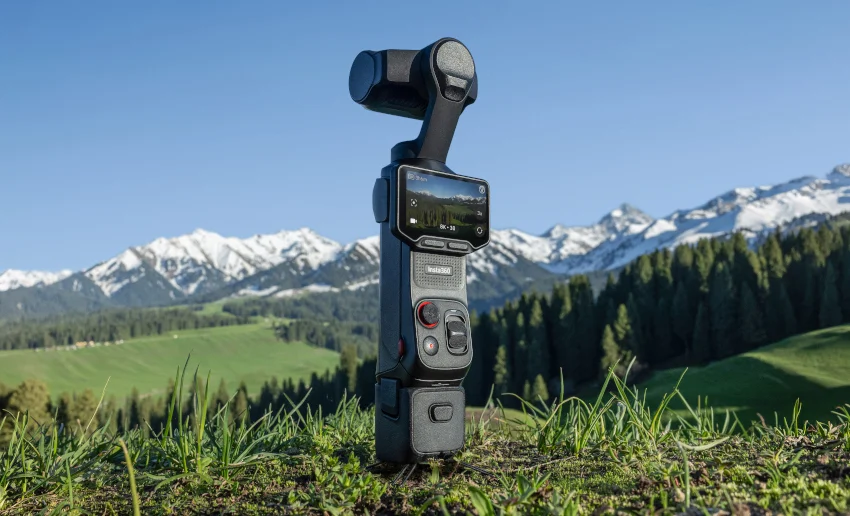
August 13, 2026 — In a move that bridges the gap between high-end hybrid shooting environments and professional post-production color pipelines, FilmConvert has officially added support for the Insta360 Luna Ultra to both FilmConvert Nitrate and CineMatch. Released earlier this summer as a powerful collaborative effort between Insta360 and legendary optics manufacturer Leica, the Luna Ultra has quickly carved out a niche for itself among high-end commercial, documentary, and travel filmmakers.
With this latest software update, creators utilizing Insta360’s flagship dual-camera gimbal system can now access dedicated camera profiles designed to optimize the log-to-Rec.709 conversion process, streamline multi-camera matching, and provide a reliable bedrock for complex color-grading and film emulation workflows.
Main Facts: What the Update Entails
The core of this software update revolves around integrating tailored color science profiles for the Insta360 Luna Ultra into two of FilmConvert’s most popular post-production plugins:
- FilmConvert Nitrate: Allows users to apply authentic film grain and precise film stock emulations using the Luna Ultra’s raw sensor data and log curves as an accurate, mathematically sound starting point.
- CineMatch: Enables precise camera-matching workflows, letting editors effortlessly align footage captured on the Luna Ultra with material from primary cinema cameras (such as RED, ARRI, Sony, or Canon systems) within the same timeline.
- Targeted Optimization for 10-Bit I-Log: The profiles are specifically engineered to handle the camera’s advanced 10-bit I-Log color profile, unlocking up to 14 stops of dynamic range while preventing clipping, unnatural skin tones, or muddy shadow recovery.
- Seamless Integration: Once updated, the profiles appear directly within the plugin’s camera selection drop-down menus, requiring no cumbersome manual workarounds or external LUT conversions.
Chronology: The Evolution of Hybrid and Action Cinematography
To understand why this integration is a milestone for modern digital imaging, it helps to examine the timeline of how compact, stabilized cameras have infiltrated professional sets:
- The Early Action-Cam Era: For years, action and compact cameras were relegated to "crash cams" or specialty angles because their compressed 8-bit codecs, aggressive sharpening, and proprietary color profiles made them notoriously difficult to match with primary A-cameras.
- The Sensor Size Revolution: As manufacturers began packing 1-inch and larger sensors into compact form factors, the dynamic range and low-light performance of smaller rigs dramatically improved.
- June 2026 – The Launch of the Insta360 Luna Ultra: Insta360 and Leica disrupted the market by introducing the Luna Ultra. Featuring a 1-inch 8K main sensor equipped with a Leica Summicron lens, a secondary 1/1.3-inch telephoto camera offering up to 12x zoom, an integrated high-performance stabilization gimbal, and professional 10-bit I-Log recording, the device blurred the line between specialized gadgetry and serious cinema tool.
- August 2026 – FilmConvert Support Integration: Recognizing the rapid adoption of the Luna Ultra by professional crews looking for an agile, lightweight B-camera or specialty rig, FilmConvert develops and deploys official native profiles for Nitrate and CineMatch, addressing the persistent pain point of disparate color science across mixed-camera shoots.
Supporting Data & Hardware Specifications
The necessity for a dedicated color profile becomes clear when examining the heavy-duty specifications packed into the Insta360 Luna Ultra’s compact frame. High-performance recording modes generate massive amounts of visual data that require equally sophisticated color management.
Insta360 Luna Ultra Key Specifications:
- Main Camera Sensor: 1-inch CMOS sensor paired with a Leica Summicron prime lens.
- Telephoto Camera Sensor: 1/1.3-inch secondary sensor supporting up to 12x hybrid zoom capabilities.
- Resolution & Framerates: Capable of capturing pristine 8K video at up to 30 frames per second, alongside high-framerate 4K options for slow-motion work.
- Color Architecture: Supports 10-bit I-Log, yielding a reported 14 stops of dynamic range that preserves critical highlight detail in bright exterior environments while digging deep into shadows.
- Stabilization: Built-in mechanical 3-axis gimbal stabilization, eliminating the need for bulky external rigs and allowing for sweeping, cinematic moves in tight spaces.
FilmConvert Integration Specs:
- Ecosystem Compatibility: Fully integrated into FilmConvert Nitrate (available for DaVinci Resolve, Adobe Premiere Pro, Final Cut Pro, and After Effects) and CineMatch.
- Workflow Impact: Eliminates generic color guessing by providing mathematical sensor responses tailored specifically to the Leica-engineered optics and Insta360 sensor architecture of the Luna Ultra.
Official Responses and Industry Perspectives
While third-party plugin developers routinely update their software, the reaction from the independent filmmaking community regarding the Luna Ultra profiles has been overwhelmingly enthusiastic. Colorists and DPs frequently report that grading footage from consumer-oriented or hybrid brands on high-end commercial timelines can introduce unwanted color shifts, particularly in the deep shadows and extreme highlights.

Industry analysts note that as camera technology democratizes—allowing filmmakers to capture 8K resolution and 10-bit log profiles from devices that fit in the palm of a hand—the software ecosystem must keep pace.
A spokesperson close to the FilmConvert development team emphasized the philosophy behind the update:
"Our goal has always been to give filmmakers the most authentic, organic foundational tools possible, regardless of the capture device. When a camera as capable as the Luna Ultra enters the market—bringing true 10-bit I-Log, a 1-inch sensor, and Leica optics into a stabilized handheld footprint—it is no longer just a specialty tool. It is being deployed on professional commercial, documentary, and narrative sets. Providing dedicated profiles ensures that editors do not have to compromise their color pipelines when cutting Luna Ultra footage alongside high-end cinema systems."
Implications for Modern Filmmakers
The inclusion of Insta360 Luna Ultra support within FilmConvert Nitrate and CineMatch carries several profound implications for contemporary video production:
1. True Multi-Camera Cohesion
One of the greatest challenges in documentary, travel, and automotive filmmaking is matching the look of a heavy cinema rig with an agile, lightweight crash cam or gimbal setup. With CineMatch now recognizing the Luna Ultra natively, colorists can effortlessly translate camera matrices. This ensures that skin tones, color separation, and highlight roll-offs remain consistent, even when cutting rapidly between an ARRI Alexa or Sony FX line camera and the Luna Ultra.
2. Streamlined Post-Production Efficiency
Before dedicated camera profiles are established, colorists often have to build complex node trees, custom power windows, and manual LUT adjustments just to get log footage into a neutral baseline before creative grading can even begin. By offering a one-click profile solution, FilmConvert drastically reduces the time spent on technical troubleshooting, allowing post-production teams to jump straight into the creative grade.

3. Elevating Hybrid Cameras to A-Grade Status
The lines separating "cinema cameras" from "action, travel, and lifestyle cameras" are blurring faster than ever. By pairing the Luna Ultra’s formidable 8K 10-bit I-Log capture with FilmConvert’s industry-standard film emulations (such as Kodak, Fujifilm, and Polaroid stocks), solo shooters and lean crews can achieve a rich, organic, celluloid aesthetic straight out of a device that can be deployed in hazardous, tight, or highly mobile scenarios.
4. Accessibility and Future-Proofing
As updates roll out across Adobe Premiere Pro, DaVinci Resolve, and Apple Final Cut Pro, users of both CineMatch and Nitrate simply need to ensure their plugins are updated to the latest version. The absence of a steep learning curve or convoluted setup process ensures that even budget-conscious indie filmmakers utilizing the Luna Ultra can immediately leverage high-end color science workflows traditionally reserved for enterprise-level productions.
How to Get Started
For filmmakers currently operating within the Insta360 Luna Ultra ecosystem, integrating these new profiles requires just a few minor steps:
- Update the Software: Ensure that your FilmConvert Nitrate or CineMatch plugins are updated to the latest software release via the official FilmConvert website or your plugin manager.
- Select the Camera Profile: Open the plugin inside your preferred non-linear editing system (NLE) or color grading suite, navigate to the camera selection menu, and choose the Insta360 Luna Ultra from the dropdown list.
- Apply Your Workflow: For CineMatch users, calibrate your target camera and match the Luna Ultra source. For Nitrate users, dial in your preferred film stock, grain response, and exposure adjustments to begin grading your 10-bit I-log footage immediately.
With this update, FilmConvert has cemented its dedication to supporting cutting-edge hardware innovations, ensuring that creators working with nimble, next-generation tools like the Insta360 Luna Ultra never have to sacrifice color fidelity or post-production creative control.
