
Blackmagic Camera for Android 3.5: Enhancing Professional Cinematography on Mobile
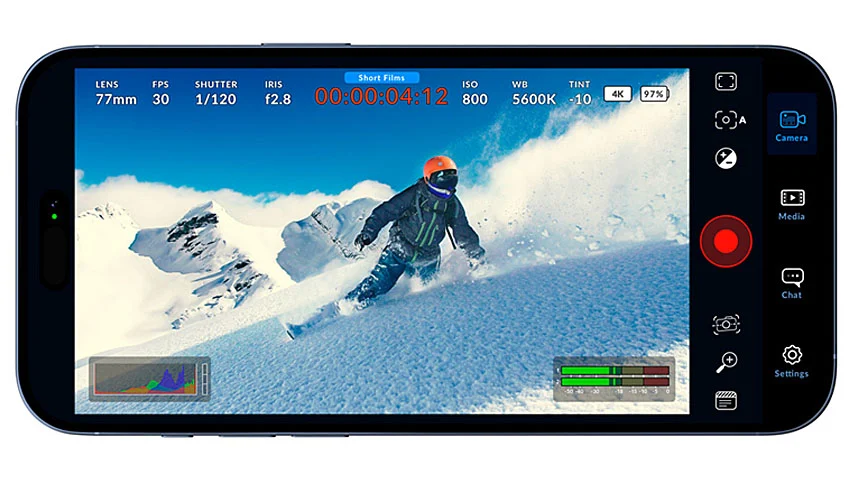
In an era where the boundary between professional cinema cameras and high-end smartphones is increasingly blurred, Blackmagic Design continues to lead the charge in professionalizing mobile videography. With the release of Blackmagic Camera for Android 3.5, the company has once again demonstrated its commitment to providing cinematographers, content creators, and mobile journalists with a feature set that mirrors the sophisticated workflows found in its larger digital film cameras.
This latest update, released in early October 2026, is not merely a bug-fix patch. Instead, it introduces a suite of workflow-oriented features designed to streamline the production process, optimize battery performance, and expand the creative potential for users of the latest flagship Android devices.
Main Facts: What’s New in Version 3.5?
Blackmagic Design’s philosophy has always been centered on user experience and technical parity with professional standards. Version 3.5 of the Blackmagic Camera app brings several critical upgrades:
- Advanced Search Functionality: A new search bar within the settings menu allows users to navigate the app’s deep feature set with unprecedented speed.
- Preset Shortcuts: Users can now utilize long-press gestures on the app icon to immediately trigger specific, pre-configured recording presets.
- 10-Bit Remote Monitoring: On supported devices, the app now enables native 10-bit previews during remote monitoring sessions, significantly improving the quality of the image being reviewed by directors or focus pullers.
- Oppo O-Log2 Support: The app now includes support for O-Log2, specifically for the Oppo Find X10 and OnePlus 16 series, enabling high-dynamic-range recording for advanced color grading.
- Platform Optimizations: The release is fully optimized for Android 17 and includes specific performance enhancements for the aforementioned Oppo and OnePlus flagship devices.
- Energy Efficiency: A suite of background optimizations has been implemented to reduce battery drain during extended recording sessions.
Chronology: The Evolution of the Blackmagic Camera App
To understand the significance of the 3.5 update, one must look at the rapid maturation of the Blackmagic Camera ecosystem. Since its initial migration from iOS to the Android platform, the app has undergone a series of rapid iterations.
The Early Days (2024–2025)
When the app first arrived on Android, it served as a proof of concept for bringing professional-grade color science and manual control to the fragmented Android market. Early versions focused on basic manual exposure, white balance, and the implementation of Blackmagic’s renowned UI.

The Professionalization Phase (2025)
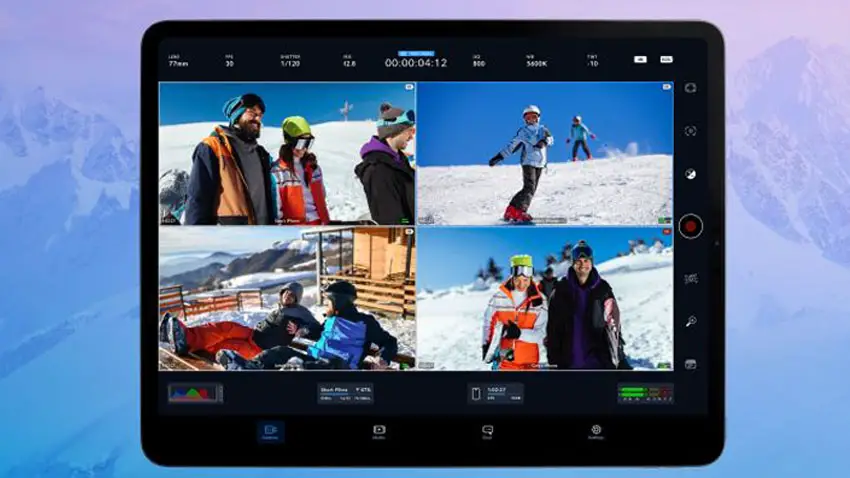
Throughout 2025, the development cycle accelerated. Updates brought support for external recording, improved codec handling, and better integration with Blackmagic Cloud. The focus shifted from "capturing video" to "managing production workflows," incorporating timecode synchronization and multi-cam monitoring.
The Current Milestone (October 2026)
With version 3.5, the app has entered a phase of "refinement." Rather than just adding new tools, Blackmagic is now addressing the friction points of mobile production. By introducing settings search and preset shortcuts, the company is acknowledging that in a fast-paced production environment, seconds matter. The integration of Android 17 support highlights Blackmagic’s commitment to staying at the bleeding edge of operating system capabilities.
Supporting Data and Technical Context
The Importance of 10-Bit Remote Previews
In professional cinematography, the ability to accurately monitor a shot is paramount. Remote monitoring allows a director or a digital imaging technician (DIT) to view the signal from a camera wirelessly. By upgrading these previews to 10-bit color depth, Blackmagic is addressing color banding and compression artifacts that often plague 8-bit monitoring. While this does not change the internal recording bit depth of the phone itself, it ensures that the monitoring signal is a more accurate representation of the scene’s color fidelity.
Understanding O-Log2
The inclusion of Oppo’s O-Log2 profile is a significant boon for colorists. Logarithmic curves are designed to capture as much dynamic range as possible by flattening the image, preventing the clipping of highlights and the crushing of shadows.
When a user shoots in O-Log2, they are recording a "digital negative." In post-production, the editor can apply a custom LUT (Look-Up Table) or perform manual grading to restore contrast and saturation. This allows for a much wider range of creative expression and ensures that the mobile footage can be better matched to cameras from brands like ARRI, RED, or Blackmagic’s own URSA line.

Battery Optimization Metrics
Recording high-bitrate, 4K video is one of the most power-intensive tasks a smartphone can perform. The 3.5 update specifically targets the background processing tasks—such as sensor polling and real-time histogram calculation—to ensure that the CPU and GPU load remains balanced. While battery life remains hardware-dependent, internal testing by Blackmagic suggests that these optimizations provide a noticeable buffer for long-form shoots, such as interviews or live event coverage.
Official Perspective and Design Intent
Blackmagic Design’s engineers have consistently stated that their goal is to provide a "professional cinematic tool" that happens to reside on a phone. In discussions surrounding the 3.5 release, the focus remains on "reducing the barrier to entry for high-end production."
By streamlining the settings menu with a search function, the company is actively listening to feedback from professional operators who found that, as the app became more complex, it became harder to change settings on the fly. The "long-press preset" feature is a direct response to the needs of solo creators who often switch between distinct looks—such as a "Cinematic 24fps" mode and a "Social Media 60fps" mode—without wanting to dig through sub-menus.
Implications for the Industry
The Changing Face of Mobile Journalism and Indie Film
The 3.5 update further cements the smartphone’s role as a legitimate B-camera or even a primary camera for low-to-mid-budget productions. With log recording and improved monitoring, a filmmaker can now shoot a project entirely on an Oppo Find X10 or OnePlus 16, confident that the footage will hold up in a professional DaVinci Resolve color-grading suite.
Competition and Market Influence
This release places significant pressure on other mobile camera app developers. The standard has been set: it is no longer enough to offer manual controls. Professional-grade workflows now require searchability, deep integration with operating system features (like Android 17’s latest APIs), and power efficiency.
Future Outlook
As hardware sensors in smartphones continue to improve, the reliance on software to bridge the gap between "snapshot" and "cinematic image" will only grow. Blackmagic’s focus on the 3.5 update suggests a roadmap that prioritizes:
- Workflow Integration: Making the phone a seamless part of a wider studio ecosystem.
- Color Science: Bringing proprietary log profiles to more hardware partners.
- UI/UX Refinement: Ensuring that as the software grows more powerful, it does not become bloated or difficult to use under pressure.
Conclusion: Is it a Game Changer?
While Blackmagic Camera 3.5 may not introduce a revolutionary new sensor or a groundbreaking codec, it represents the vital "polishing" phase of software development. For the working professional, the value of this update lies in its reliability and efficiency. By making it easier to search for settings, launch configurations, and monitor images with higher fidelity, Blackmagic Design has once again proved that they are not just building an app—they are building a platform for the next generation of mobile cinematographers.
The update is available now as a free download for compatible devices, and for those equipped with the latest hardware from Oppo and OnePlus, it is an essential upgrade for any serious video production workflow. As the industry moves toward a future where "camera" is defined by software capability as much as physical lens glass, Blackmagic Design remains the vanguard of that transition.
