
Blackmagic Design Releases DaVinci Resolve 21.1.1: A Comprehensive Look at the New Maintenance Update
Main Facts
Following the major feature rollout of version 21.1, Blackmagic Design has officially released DaVinci Resolve 21.1.1. This targeted maintenance update is engineered to fine-tune everyday editing, advanced audio handling, Fusion visual effects, and multi-user collaborative post-production workflows. While it steers clear of massive architectural overhauls, the patch introduces highly requested optimizations, such as enhanced Trim Editor controls, native USAC audio decoding on Windows 11, and CR3 RAW support for the Canon EOS R8 Mark II.
The update is now available for download across both the free version of DaVinci Resolve 21.1.1 and the advanced DaVinci Resolve 21.1.1 Studio edition. By concentrating heavily on stability fixes, API enhancements, and codec performance, Blackmagic Design continues to demonstrate its commitment to streamlining professional pipelines for editors, colorists, and VFX artists worldwide.
Chronology of the Release and Development Lifecycle
To fully understand where DaVinci Resolve 21.1.1 fits into the post-production software landscape, it is helpful to look at the timeline of its deployment and the iterative nature of Blackmagic Design’s software philosophy:
- The Major Milestone (Resolve 21.1): Blackmagic Design introduced a significant wave of new tools, performance optimizations, and interface tweaks that fundamentally expanded what editors could achieve natively within the application.
- The Identification of Edge-Case Friction: Immediately following the 21.1 launch, professional post-production facilities and independent creators reported minor workflow friction points. These included challenges with multi-instance Fusion effect stacking, multi-user collaboration connection drops, and specific trimming behaviors in long-form timelines.
- The 21.1.1 Maintenance Patch: Addressing these community-reported bottlenecks directly, Blackmagic Design developed the 21.1.1 maintenance release. Rather than delaying fixes for a future quarterly milestone, the engineering team deployed this focused patch to immediately stabilize day-to-day operations.
- Continuous Pipeline Integration: Released concurrently for macOS, Windows, and Linux ecosystems, the update seamlessly integrates into existing production environments without requiring project database migrations, ensuring that ongoing shows and commercial projects face zero downtime.
Supporting Data and Detailed Feature Breakdown
DaVinci Resolve 21.1.1 is packed with subtle yet impactful enhancements spanning virtually every page of the application. Below is a detailed breakdown of the primary improvements included in this maintenance release.
1. Advanced Trim Editor Controls and Audio-Only Capabilities
The Trim Editor receives some of the most practical workflow enhancements in this update. Editors working on complex, long-form timelines can now execute viewer-based trim actions that affect all selected edit points simultaneously, eliminating the tedious need to adjust cuts individually.
Furthermore, mouse-based Trim Editor actions now incorporate real-time audio previews, offering immediate audible feedback during adjustments. In a major win for sound editors and dialogue matchers, the viewer now natively supports editing audio-only clips. This means sound designers can utilize the Trim Editor directly for music, sound effects, and dialogue assembly where a picture reference is unnecessary.
2. Streamlined Fusion Effect Management
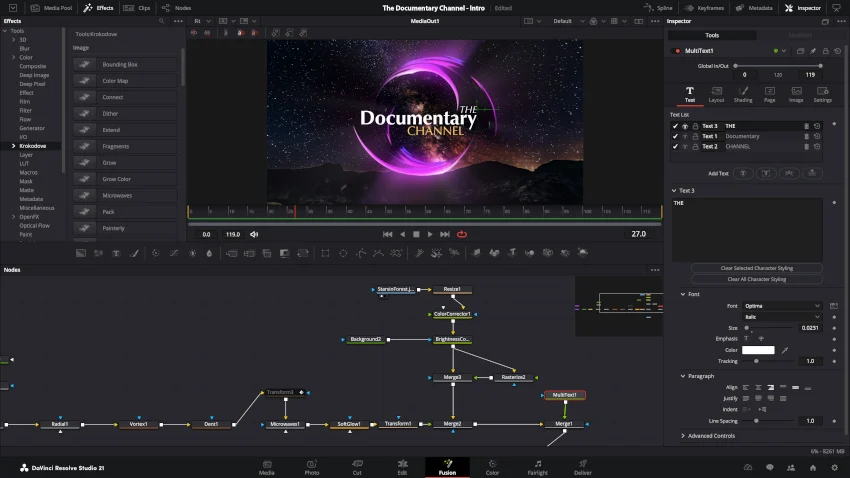
Managing complex node structures and layered visual effects has traditionally required meticulous Inspector management. Resolve 21.1.1 addresses how multiple instances of the same Fusion effect applied to a single clip are handled.
The update prevents individual instances from combining in ways that obscure their custom controls. Creators can now apply the same Fusion effect multiple times with varying parameters on a single clip, retaining direct, independent control over each instance within the Inspector. Additionally, a reported Magic Mask slowdown on the Fusion page has been mitigated, restoring snappy playback and mask-tracking performance.
3. USAC Audio Decoding on Windows 11
Windows 11 creators gain native USAC (Unified Speech and Audio Coding) audio decoding support. As an advanced MPEG audio coding standard optimized for handling both high-fidelity speech and general audio concurrently, USAC is becoming increasingly prevalent in modern broadcast and web delivery formats. By enabling native decoding directly within DaVinci Resolve on Windows 11, Blackmagic Design eliminates the cumbersome requirement to transcode or convert these audio streams prior to editing.
4. Canon EOS R8 Mark II CR3 RAW Support
Hybrid shooters and contemporary cinematographers utilizing the Canon EOS R8 Mark II will welcome the addition of native CR3 RAW decoding support. This inclusion ensures that still-image RAW assets captured on the R8 Mark II can effortlessly travel through the same color-managed, high-dynamic-range post-production workflows as moving image assets, bridging the gap between photography and motion picture pipelines.

5. Robust Multi-User Collaboration and Memory Management
For collaborative post-production facilities where editors, colorists, and sound designers work simultaneously from a shared project database, connection stability is paramount. Resolve 21.1.1 includes critical bug fixes designed to resolve multi-user collaboration connectivity drops. Additionally, the update optimizes NVIDIA decode memory usage for specific R3D NE clips, significantly bolstering system stability during heavy playback of native RED footage.
6. Expanded Developer APIs and Automated Workflows
Development teams and post-production systems integrators will benefit from newly introduced asynchronous API support. Operations can now run asynchronously, drastically reducing interface freezes during heavy batch processing. Furthermore, a new ApplyGradeFromDRX API option has been introduced, allowing custom scripts to apply color grades across all node layers programmatically.
Official Responses and Industry Reception
While Blackmagic Design typically lets its software releases speak for themselves through detailed change logs, industry reactions from early adopters, beta testers, and professional post-production supervisors have been overwhelmingly positive.
Early feedback from high-end facility engineers indicates that the multi-user collaboration fixes have measurably reduced dropped connections on local area networks. Meanwhile, long-form television editors have praised the audio preview implementation during mouse-based trimming, noting that it cuts down the time spent bouncing back and forth between the Edit and Fairlight pages.
Independent colorists and finishing artists have similarly commended the refined Inspector handling for multiple Fusion effects, describing it as a "QoL (Quality of Life) miracle" for projects requiring repeated, stacked procedural effects on localized clips.
Implications for the Post-Production Industry
The release of DaVinci Resolve 21.1.1 carries several important implications for the future of professional editing suites:
Bridging the Gap Between NLE and DAW Workflows
By introducing audio-only clip editing directly inside the Trim Editor and pairing it with mouse-based trimming audio previews, Blackmagic Design is steadily blurring the traditional lines between video editing and sound design suites. Editors can now perform micro-adjustments to dialogue and score cues with acoustic confidence, reducing the cognitive load of switching workflows mid-scene.
Strengthening Enterprise Adoption Through Stability
While flashy new features capture headlines, enterprise-level post-production facilities judge software by its reliability under pressure. By prioritizing bug fixes, memory management optimizations for NVIDIA GPUs, and fortified multi-user collaboration connectivity, Blackmagic Design solidifies Resolve’s position as a dependable backbone for large-scale, multi-seat collaborative environments.
The Democratization of Advanced Codecs and Formats
The inclusion of Windows 11 USAC audio decoding and Canon EOS R8 Mark II CR3 RAW support demonstrates a proactive approach to evolving capture and delivery codecs. As broadcasting standards shift and hybrid camera ecosystems expand, maintaining day-one or early-stage compatibility ensures that independent creators and boutique studios never hit a technical roadblock when ingesting client media.
In summary, DaVinci Resolve 21.1.1 proves that software updates do not always need to reinvent the wheel to be profoundly valuable. By polishing existing mechanics, fixing persistent collaboration bugs, and expanding practical utility across editing, Fusion, and Fairlight, Blackmagic Design has delivered an essential maintenance patch that keeps professional pipelines running faster, smoother, and more reliably than ever before.
