
Mastering Image Fidelity: How to Eliminate Aliasing in Action Camera Footage
In the world of high-octane cinematography, action cameras—such as GoPros, DJI Osmo Actions, and various drone-mounted systems—have revolutionized how we capture the world. From the rugged peaks of the Himalayas to the fast-paced POV of a mountain biker, these devices provide perspectives once thought impossible for independent filmmakers. However, this accessibility comes with a technical caveat: the "jagged edge" phenomenon known as aliasing.
For many content creators, the high-contrast, over-sharpened aesthetic of action footage can look unprofessional when viewed on high-resolution displays. This guide explores the technical roots of aliasing and provides a professional workflow for mitigating these artifacts using industry-standard tools like Adobe After Effects and the FXAA plugin.
Main Facts: Decoding the Aliasing Artifact
At its core, aliasing is a visual distortion characterized by "stair-stepped" or jagged edges on diagonal lines and fine textures. In digital video, this occurs due to a "sampling error"—a failure of the camera’s sensor to capture enough spatial detail to accurately represent the scene at the target resolution.

When a digital sensor attempts to record fine, high-contrast detail, the lines often fall between pixels. If the sensor resolution is insufficient, the software struggles to reconstruct those lines, resulting in the characteristic "shimmering" or "stair-stepping" effect. While this is a common issue across all digital imaging, it is particularly prevalent in action cameras, drones, and smartphone sensors due to their physical constraints.
The Sensor Constraint
The primary culprit is the physical size of the camera sensor. Because action cameras must be compact, they utilize smaller sensors. These sensors are often paired with aggressive, built-in image processing algorithms that apply heavy sharpening to make the footage appear "crisper" out of the camera. Unfortunately, this digital sharpening often exacerbates aliasing, turning a minor sampling issue into a distracting, high-frequency visual artifact that can ruin the cinematic quality of a shot.
Chronology: The Evolution of Post-Production Fixes
The history of correcting aliasing in post-production has evolved from blunt, destructive tools to sophisticated, algorithm-based solutions.
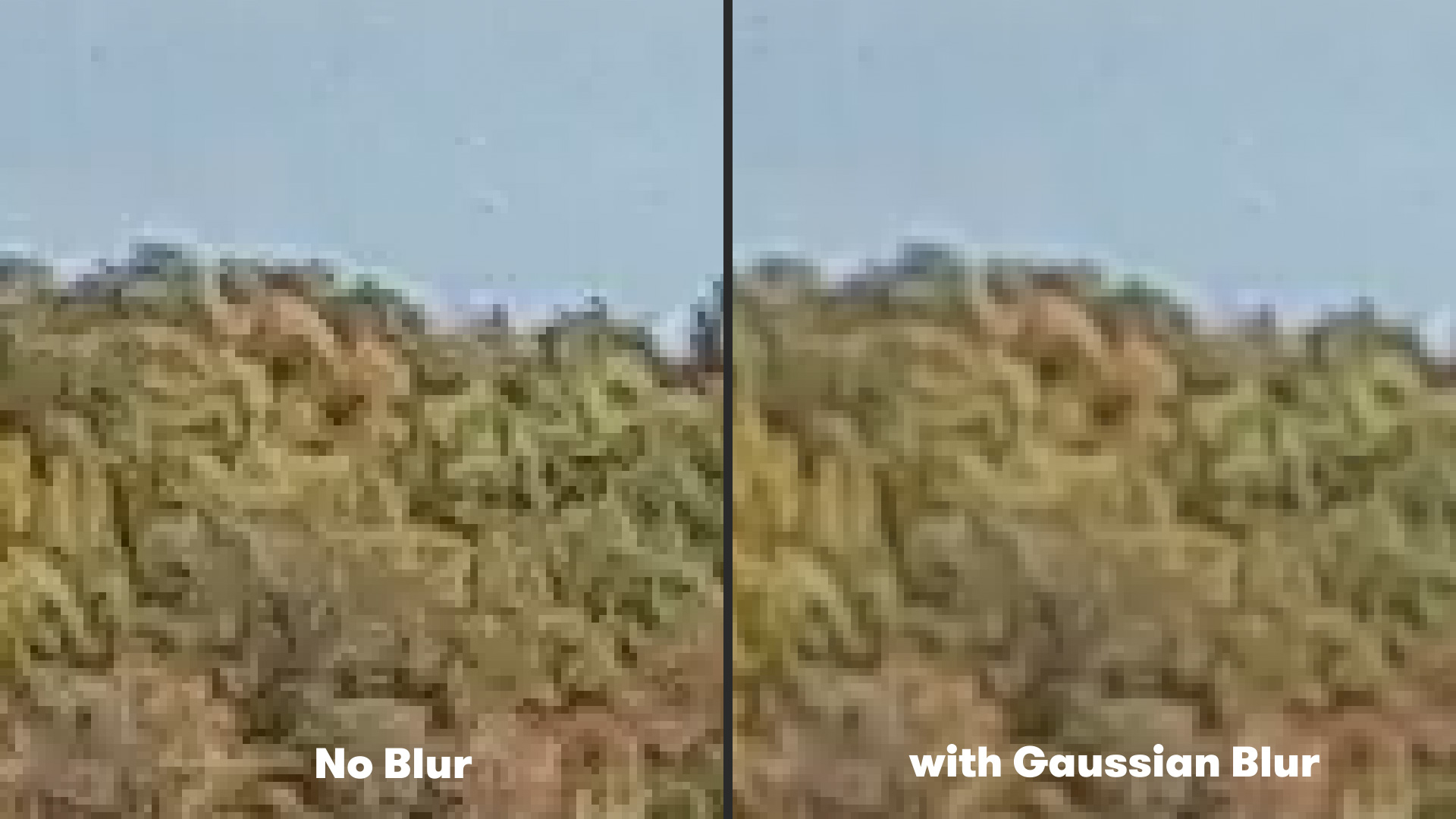
- The Era of Global Blur (Pre-2015): Early editors relied on universal blurs to mask jagged edges. By applying a slight Gaussian Blur to the entire frame, editors could "soften" the harshness of aliasing. The significant drawback was the sacrifice of overall image sharpness; the fix often made the footage look muddy or out of focus.
- The Rise of Spatial Filtering (2015–2020): As processing power increased, more complex spatial filters began to emerge. These filters allowed editors to target high-contrast areas specifically, but these tools were often expensive or difficult to implement within a fast-paced workflow.
- The Algorithmic Modern Era (2020–Present): With the release of plugins like FXAA (Fast Approximate Anti-Aliasing), creators can now utilize edge-detection algorithms. These tools distinguish between intentional detail and aliasing artifacts, applying smoothing only where necessary. This has become the gold standard for quick, efficient, and professional-grade cleanup.
Supporting Data: Why Small Sensors Struggle
To understand why action cameras are prone to this issue, we must look at the relationship between pixel density and sensor size.
- Pixel Density: Modern action cameras often pack 4K or even 5.3K resolution into sensors smaller than 1/2.3 inches. This creates extremely small individual pixels (photosites), which are prone to crosstalk and noise.
- Sharpening Algorithms: Most manufacturers—in an effort to compete with larger DSLR/Mirrorless cameras—apply a "sharpening mask" to the video file in-camera. This mask boosts the contrast of edges, which, while aesthetically pleasing on a tiny screen, creates severe aliasing when viewed on a 4K television or monitor.
- Compression Impact: Many action cameras record at aggressive compression ratios (e.g., H.264/H.265). Compression artifacts often interact with aliasing, creating a "crawling" effect that is visually fatiguing to the viewer. When you attempt to grade this footage, these artifacts often become more pronounced, as the color correction process stretches the underlying pixel data.
Official Perspectives and Professional Workflows
Industry professionals generally agree that while the best way to handle aliasing is at the source (by lowering in-camera sharpening or using ND filters to force a more natural shutter speed), post-production intervention is often a necessity.
The "Old Method": Gaussian Blur
For those who do not wish to install third-party plugins, the traditional method remains a staple, albeit one with limitations.
- Process: Import the footage into After Effects, navigate to
Effect > Blur & Sharpen > Gaussian Blur. - Setting: A blurriness value of 1.5 to 2.0 is typically sufficient to mitigate flickering without turning the footage into a soft mess.
- The Verdict: This is a "global" fix. It lacks finesse, but it remains a quick, built-in solution for emergency situations.
The "Modern Method": FXAA
The FXAA plugin by Plugin Everything has become a staple for editors who need speed and precision. Unlike a global blur, FXAA uses edge detection. It scans the frame for high-contrast, jagged boundaries and applies a localized anti-aliasing filter.
- Workflow:
- Drag the FXAA effect onto your layer in After Effects.
- Because it uses an edge-detection algorithm, the processing load is significantly lower than that of complex blurs.
- If the effect is too subtle, the plugin allows for "stacking"—applying multiple instances of the effect until the desired level of smoothness is achieved.
Implications: The Future of Cinematic Action Footage
The prevalence of aliasing has broader implications for the future of independent filmmaking. As we move toward a standard of 4K and 8K delivery, viewers are increasingly sensitive to artifacts that were once hidden by lower-resolution formats.
Maintaining Professionalism
The use of software-based anti-aliasing represents a shift in how we define "raw" footage. It is no longer just about color grading; it is about "texture grading." Editors must now take on the role of digital restorationists, cleaning up the technological limitations of the hardware to maintain the suspension of disbelief.
The Workflow Trade-off
While tools like FXAA are highly effective, they do not replace high-quality optics. The implication for future gear purchases is clear: sensor quality will continue to outweigh resolution counts. Filmmakers should prioritize cameras with larger sensors and higher bit-depths, as these provide a cleaner base that requires less "reconstruction" in post.
However, for the millions of creators already equipped with action cameras, the ability to clean up footage via plugins provides a vital lifeline. It allows for a cohesive look between "A-roll" footage shot on a professional cinema camera and "B-roll" action footage shot on a GoPro, ensuring that the final edit feels like a singular, polished product.
Conclusion: A Balanced Approach
Aliasing is a challenge, but it is not an insurmountable one. By understanding the interaction between hardware sharpening and digital sampling, creators can utilize modern tools to refine their work. Whether you are using the traditional Gaussian Blur for a quick fix or the advanced, edge-aware FXAA for a surgical approach, the goal remains the same: ensuring that the viewer is immersed in the action, not distracted by the technical shortcomings of the capture device. As technology continues to evolve, the gap between the professional cinema camera and the action cam will continue to shrink, provided we remain diligent in our post-production workflows.
