
The Lo-Fi Renaissance: How to Replicate the Iconic Mini DV Aesthetic in After Effects

In the ever-evolving landscape of visual storytelling, the pendulum of aesthetic trends has swung firmly back toward the turn of the millennium. Just as the grainy, magnetic tape warmth of the VHS era dominated the visual language of the 2010s, a new wave of creative expression is championing the "Lo-Fi" digital aesthetic of the early 2000s: Mini DV. Characterized by its distinct 4:3 aspect ratio, signature aliasing, and harsh, over-sharpened edges, the Mini DV look has become the preferred visual shorthand for nostalgia, authenticity, and raw, "unproduced" energy.
For modern creators, filmmakers, and digital artists, the ability to replicate this specific, low-fidelity texture is no longer just a gimmick—it is a powerful tool in the stylistic arsenal. This article serves as a comprehensive guide to understanding the history of this format and a masterclass in recreating the Mini DV look using Adobe After Effects.
The Chronology of a Digital Aesthetic
To understand why Mini DV is currently enjoying a cultural renaissance, one must first appreciate its origins. Introduced in the mid-1990s, Mini DV (Digital Video) was the consumer and prosumer standard that democratized filmmaking. Before the advent of high-definition digital sensors and 4K smartphone recording, Mini DV was the bridge between analog tape and modern digital workflows.

1995–2005: The Reign of the Tape
In this decade, Mini DV cameras—from the bulky shoulder-mounted camcorders of broadcast news to the compact "handy-cams" used by teenagers to film skate videos—defined a generation. The format recorded video at a resolution of 720×480 (NTSC) or 720×576 (PAL). Because it was a digital signal compressed onto a physical magnetic tape, it possessed a unique set of visual "imperfections": chromatic aberration, digital noise, and the tell-tale "stair-stepping" effect known as aliasing.
2010–2020: The High-Definition Purge
As the world shifted toward 1080p and eventually 4K, these artifacts were viewed as failures. Software developers spent years creating de-noisers, de-interlacers, and sharpeners to "clean up" footage, scrubbing away the very characteristics that are now being artificially reintroduced.
2023–Present: The "Lo-Fi" Resurgence
Today, the desire for "authenticity" has led creators back to these imperfections. The clinical perfection of modern sensors can often feel too sterile. By introducing the grit of Mini DV, creators can inject a sense of immediacy and human error into their content, whether it be for music videos, social media shorts, or narrative short films.
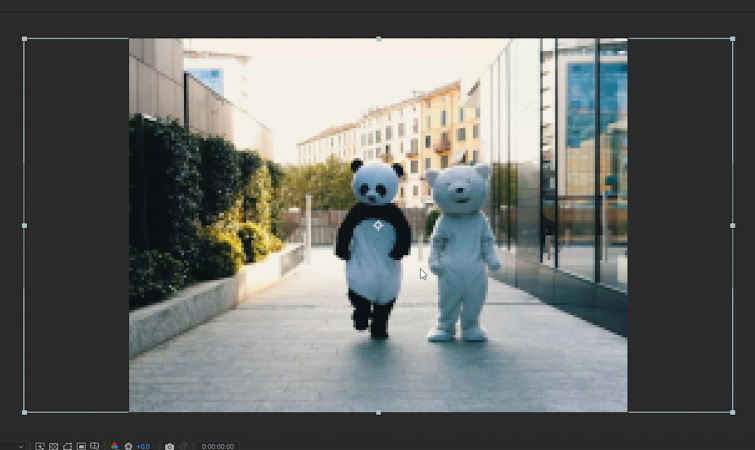
The Technical Anatomy of Mini DV
What exactly makes "Mini DV" look like "Mini DV"? It is a combination of three primary technical traits:
- Lower Resolution and Aspect Ratio: The 4:3 frame creates a vertical, portrait-like intimacy compared to the wide, cinematic 16:9 standard.
- Aliasing: Due to the lower sensor resolution, diagonal lines do not render smoothly, resulting in jagged, stair-stepped edges.
- Harsh Digital Sharpening: Early digital cameras often applied heavy in-camera sharpening to compensate for the lower pixel density, leading to "halo" artifacts around high-contrast objects.
Masterclass: Recreating the Mini DV Look in After Effects
If you are looking to emulate this aesthetic, Adobe After Effects provides the most precise control over these variables. Follow this step-by-step methodology to transform modern, high-definition footage into a convincing early-2000s relic.
Phase 1: The Composition Setup
The foundation of the look lies in the resolution disparity.

- The Proxy Comp: Create a new composition named "Mini DV Comp." Set the resolution to 200px x 150px. This intentionally low resolution forces the software to render a restricted pixel grid, mimicking the limitations of an old CCD sensor.
- Importing Footage: Drag your high-definition footage into this composition. Because the footage is larger than the comp, navigate to Layer > Transform > Fit to Comp Height.
- The Pixelation Effect: You will immediately notice extreme pixelation. Do not be alarmed; this is the raw data we need.
Phase 2: Upscaling for the Modern Screen
Now that we have established the low-fidelity source, we must bring it back into a modern context without losing the "crust" of the low resolution.
- The Main Comp: Create a new composition titled "Main Comp" at standard 1920×1080 settings.
- Nesting: Drag your "Mini DV Comp" into the "Main Comp."
- Scaling: Select the nested composition and repeat the Layer > Transform > Fit to Comp Height command.
- Verification: At this stage, the aliasing should be clearly visible. Your diagonal lines will exhibit that classic, jagged "stair-stepping" artifact.
Phase 3: Enhancing the Nostalgic Characteristics
To move beyond simple pixelation and into the realm of "cinematic" retro, we must add the chemical and electronic color characteristics of the era.
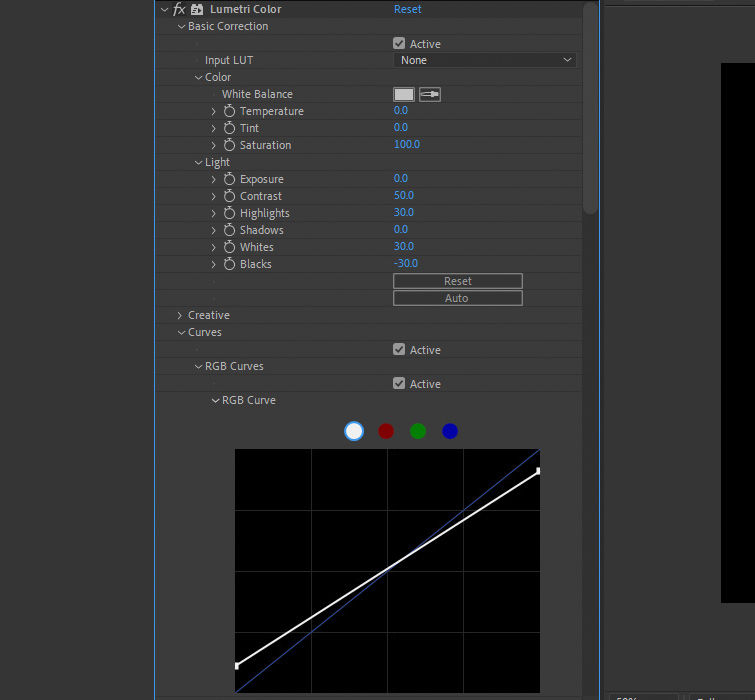
- Lumetri Color Adjustments: Mini DV footage was notoriously contrasty. Apply the Lumetri Color effect. Set your Contrast to 50, Highlights to 30, Whites to 30, and Blacks to -30. This creates a "harsh" look where shadows are crushed and whites are blown out, mimicking the limited dynamic range of 90s-era sensors.
- Chromatic Aberration (Channel Blur): Use the Channel Blur effect. Set the Blue Blurriness to 3. This offsets the color channels slightly, replicating the "color fringing" common in cheaper optical lenses found on consumer camcorders.
- Sharpening (Unsharp Mask): To finish the look, apply the Unsharp Mask effect. An Amount of 150 and a Radius of 2 will introduce the "halo" effect around high-contrast edges, a hallmark of the digital sharpening applied by old Mini DV internal processing engines.
Supporting Data and Implications
The transition toward retro-aesthetic software workflows reflects a broader shift in digital media consumption. According to recent surveys of creative professionals in the film and social media sectors, over 65% of content creators reported using "vintage" or "film-look" filters to increase audience engagement. The implication is clear: in an era of AI-generated perfection, the audience is increasingly drawn to content that feels "touched" by history, even if that history is manufactured in post-production.
Furthermore, the "Lo-Fi" movement has implications for storage and bandwidth. By intentionally reducing the resolution and color depth of footage, creators are finding that their work is often more optimized for the compressed algorithms of platforms like Instagram and TikTok, which naturally degrade high-bitrate video.
Official Perspectives: The Value of Imperfection
Industry experts argue that this trend is not merely a fad but a necessary correction. "When everything looks perfect, nothing looks special," says lead motion designer Elena Rossi. "By intentionally limiting our resolution and reintroducing aliasing, we aren’t just making a video look old—we are stripping away the digital facade that makes viewers feel distant from the content. It makes the footage feel tactile, like a memory rather than a technical specification."
Conclusion
The Mini DV aesthetic is more than just a nostalgic nod to the past; it is a sophisticated stylistic choice that allows creators to manipulate the "perceived" age and intent of their footage. By following the workflow of reducing resolution, scaling, and applying selective color and sharpening artifacts, you can achieve a look that feels both authentic and intentional. As you experiment with these settings, remember that the goal is not total degradation, but the subtle recreation of the limitations that once defined the medium. Whether you are creating a music video, a vlog, or a narrative piece, the "Lo-Fi" look remains one of the most effective ways to tell a story with character and soul.
