
The Resurgence of Lo-Fi: Mastering the Mini DV Aesthetic in After Effects

In an era defined by 8K resolution, cinematic color grading, and hyper-realistic visual effects, a curious counter-movement has emerged within the creative community. Much like the cyclical return of vinyl records and film photography, the digital aesthetic of the late 1990s and early 2000s—specifically the "Mini DV" look—is undergoing a profound renaissance.
As modern filmmakers seek to inject authenticity, nostalgia, and a tactile "lo-fi" quality into their work, the visual artifacts once considered technical failures of early digital consumer cameras have become the gold standard for contemporary stylistic expression. This guide explores the cultural implications of this trend and provides a technical roadmap for recreating this distinct retro aesthetic within Adobe After Effects.
The Main Facts: Why Mini DV is Trending
The Mini DV format, which rose to prominence in the mid-90s, was once the pinnacle of home movie technology. However, by modern standards, its output is riddled with technical imperfections: poor dynamic range, aggressive digital compression, color bleeding, and a low-resolution 4:3 aspect ratio.

Ironically, it is these exact limitations that have made Mini DV a sought-after aesthetic. Today’s creatives, ranging from high-end music video directors to social media content creators, are utilizing this "LoFi" look to ground their footage in a sense of time and place. The visual language of Mini DV evokes a subconscious association with the "home video" era, providing an immediate sense of intimacy, spontaneity, and unpolished truth that high-fidelity digital cinema often lacks.
A Chronology of the Digital Retro Movement
To understand the current obsession with Mini DV, one must look at the timeline of digital nostalgia:
- The VHS Era (2015–2019): The movement began with the popularity of the "VHS look"—characterized by magnetic tape tracking errors, heavy chromatic aberration, and distinct scanlines. This set the stage for a broader appreciation of analog-adjacent digital artifacts.
- The Rise of Early Digital (2020–2022): As the novelty of analog tape waned, creators began looking toward the dawn of the digital age. Mini DV, which bridged the gap between analog tape and modern tapeless recording, became the logical next step.
- Mainstream Adoption (2023–Present): The aesthetic has permeated mainstream media, including fashion campaigns, documentaries, and narrative short films, signaling that "LoFi" is no longer just a niche subculture interest but a legitimate stylistic choice in professional cinematography.
Supporting Data: The Anatomy of the Look
Recreating the Mini DV aesthetic is not merely about lowering resolution; it is about simulating the specific hardware limitations of the era. The look is defined by four core technical pillars:
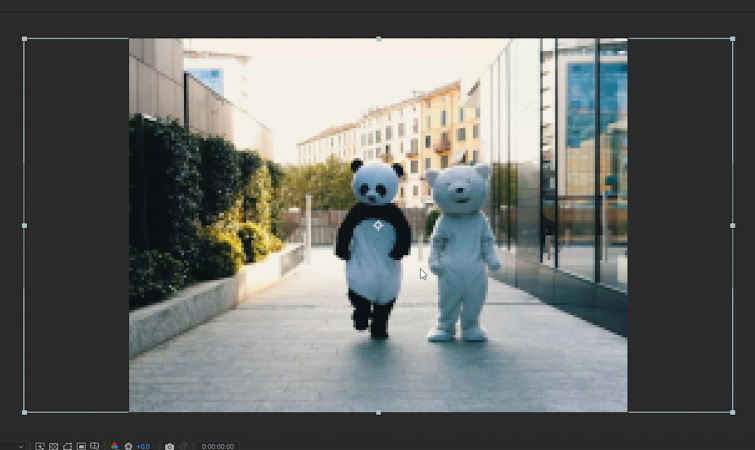
- Aspect Ratio and Resolution: The 4:3 frame, typically at a 720×480 resolution, forces a different composition style than the standard 16:9 cinematic frame.
- Aliasing: Due to the lower resolution and poor scaling algorithms of the time, diagonal lines in Mini DV footage exhibit "stair-stepping" or jagged edges.
- Color Fringing: Early digital sensors often struggled with color registration, leading to subtle separation or "bleeding" of color channels, particularly noticeable on high-contrast edges.
- Harsh Contrast: Mini DV sensors lacked the latitude of modern CMOS sensors, resulting in blown-out highlights and crushed shadows.
Technical Guide: Implementing the Mini DV Look in After Effects
If you are a filmmaker looking to integrate this aesthetic into your workflow, the following step-by-step process will allow you to transform high-definition footage into a convincing period-accurate simulation.
Step 1: Establishing the Composition
Begin by creating a new composition titled "Mini DV Comp." Set the resolution to 200px x 150px. This low-resolution canvas is the foundation of the process. Drag your high-definition footage into this composition. To properly downsample the footage, navigate to Layer > Transform > Fit to Comp Height. You will immediately notice extreme pixelation; this is expected and necessary for the final result.
Step 2: The Upscaling Process
Create a second composition, "Main Comp," set to your standard output resolution (e.g., 1920px x 1080px). Drop the "Mini DV Comp" into this new sequence. Once again, select the nested layer and apply Layer > Transform > Fit to Comp Height. By forcing the low-resolution file to expand, you introduce the essential aliasing artifacts that define the Mini DV aesthetic. The "stair-stepping" on horizontal lines and the flickering edges are the tell-tale signs of the hardware’s inability to process fine detail at high resolutions.

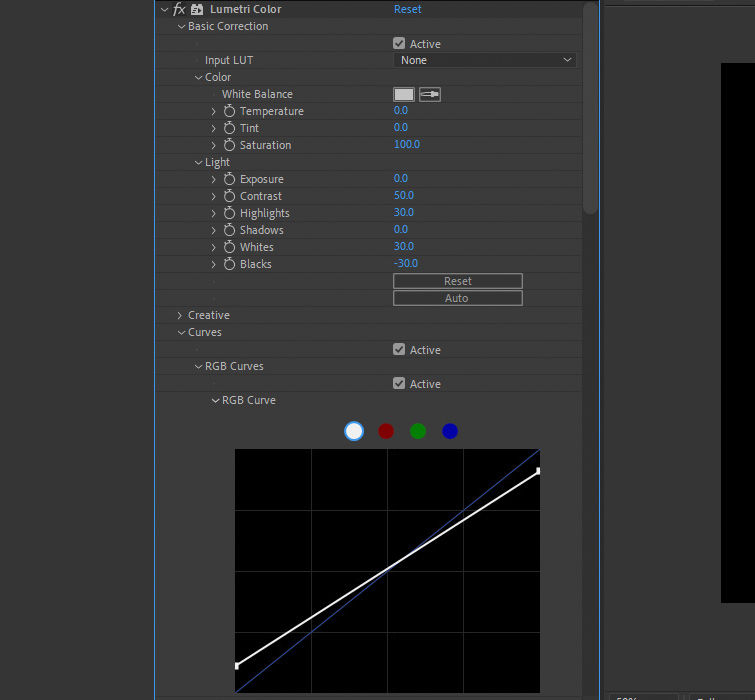
Step 3: Enhancing with Lumetri Color
To push the "nostalgic" feel, we must replicate the harsh color science of the era. Apply the Lumetri Color effect to your Mini DV layer.
- Contrast: Increase to 50.
- Highlights: Set to 30.
- Whites: Set to 30.
- Blacks: Set to -30.
This aggressive adjustment mimics the limited dynamic range of the era’s CCD sensors. For further refinement, utilize the RGB Curve to adjust the white and black points, ensuring the image feels "crunchy" and authentic.
Step 4: Adding Vintage Color Fringing
Digital cameras of the 90s frequently suffered from chromatic aberration caused by low-quality lenses and sensor registration errors. To replicate this, apply the Channel Blur effect. Set the Blue Blurriness to 3. This subtle shift creates a vintage color fringe that is a hallmark of the Mini DV look.
Step 5: Final Sharpening with Unsharp Mask
To emphasize the aliasing and "harsh" edges, apply the Unsharp Mask effect. Set the Amount to 150 and the Radius to 2. This will introduce a halo effect around high-contrast areas, further simulating the way early digital cameras sharpened footage internally, often at the cost of image quality.
Official Perspectives: The Philosophy of Limitations
Industry experts note that this trend is a reaction to the "perfection" of modern cinematography. In a world where cameras capture near-perfect images, the human eye is becoming fatigued by the lack of texture. By reintroducing these "flaws," creators are essentially adding "digital grain," which provides a subconscious sense of authenticity.
"The imperfections are the story," says one lead visual effects artist. "When you remove the clinical sharpness of a 4K sensor, you leave room for the viewer to fill in the gaps. The Mini DV look is nostalgic not just because it’s old, but because it feels human."
Implications for Future Production
The rise of the Mini DV aesthetic has significant implications for how we produce content. It democratizes the filmmaking process by suggesting that high-end, expensive gear is not the only path to a professional, stylized look.

Furthermore, it challenges the industry to rethink the value of "resolution." For years, the push has been toward higher pixel counts. However, as this trend demonstrates, resolution is merely a tool, not the objective. The true goal of any visual medium is the communication of mood, and sometimes, the most effective way to communicate a specific emotion is to strip away the technology and embrace the limitations of the past.
As you begin to apply these techniques, remember that the "Mini DV look" is a spectrum. Do not be afraid to adjust the settings to suit your specific footage. Whether you are aiming for the raw, unkempt vibe of a 90s concert video or the soft, dreamlike memory of a family vacation, the tools within After Effects provide the flexibility to craft the perfect level of nostalgic distortion.
For those looking to expand their retro arsenal, mastering these techniques in After Effects is just the beginning. The shift toward analog and early-digital aesthetics is likely to persist, making these skills invaluable for any modern creative.
