
Blackmagic Camera for Android 3.5 Released: A Comprehensive Guide to Workflow Enhancements, Native 10-Bit Previews, and Log Recording
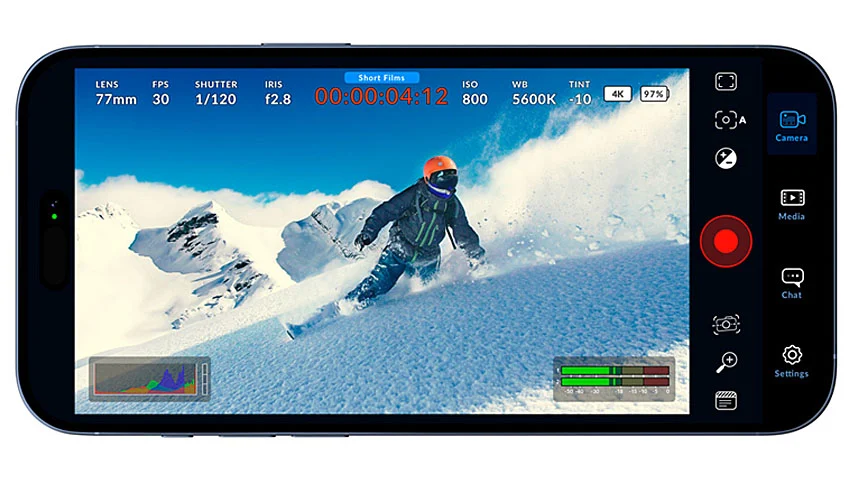
October 8, 2026 — Blackmagic Design has officially released Blackmagic Camera for Android 3.5, a targeted software update designed to streamline mobile video production and bridge the gap between pocket-sized convenience and professional-grade control. As mobile cinematography continues to mature into a legitimate medium for independent filmmakers, journalists, and high-end commercial creators, the demand for granular manual controls, optimized power management, and seamless on-set workflows has never been higher.
The version 3.5 update addresses these demands head-on. It introduces a heavily requested settings search engine, rapid preset launcher shortcuts, native 10-bit remote monitoring previews on supported hardware, and dedicated Oppo O-Log2 recording support for elite devices like the Oppo Find X10 and OnePlus 16 series. Furthermore, the update rolls out critical performance optimizations for Android 17, ensuring long-term compatibility and reduced battery drain during extended field recording sessions.
Available now as a free download directly from Blackmagic Design, this iteration solidifies the application’s position as an indispensable tool for Android-based content creation.
Main Facts: What’s New in Version 3.5?
The Blackmagic Camera for Android 3.5 update brings a suite of features that drastically improve how cinematographers interact with their mobile devices on set. Rather than focusing solely on raw capture specifications, this update refines the user experience, making the app faster to configure, easier to monitor remotely, and more efficient to power.
- In-App Settings Search Engine: Users can now locate specific technical parameters, codecs, frame rates, and audio inputs instantly via a new dedicated search bar within the settings menu, cutting down navigation time during fast-paced shoots.
- Preset Shortcuts via App Icon: By utilizing a press-and-hold gesture on the Blackmagic Camera app icon, operators can bypass the home screen and immediately launch the application with a pre-selected configuration loaded.
- Native 10-Bit Remote Previews: When utilizing remote control functionality on supported hardware, directors and camera assistants can now view feeds in native 10-bit color, significantly enhancing accuracy when evaluating lighting, exposure, and color fidelity from a distance.
- Oppo O-Log2 Integration: High-end mobile shooters utilizing the Oppo Find X10 and OnePlus 16 series can now shoot using Oppo’s proprietary O-Log2 profile, unlocking maximum dynamic range for post-production color grading.
- Android 17 and Hardware Optimizations: The update brings native optimization for the Android 17 operating system alongside specific performance tweaks for the Oppo and OnePlus flagship lines.
- Enhanced Power Efficiency: Core architectural improvements have been implemented to reduce thermal output and battery consumption during active recording states.
Chronology: The Evolution of Mobile Professional Cinema
To understand the significance of the version 3.5 update, it is helpful to look back at the rapid trajectory of mobile filmmaking software over recent years.
The Early Frontier of Smartphone Video
For over a decade, shooting high-end video on smartphones was held back by restrictive native camera applications. While hardware sensors grew progressively larger and more capable—incorporating multi-lens setups, advanced stabilization, and larger pixels—software limitations forced creators to rely on third-party apps that often lacked professional monitoring tools, manual shutter angle controls, and standard professional codecs like ProRes or custom log curves.
The Arrival of Blackmagic Camera on Android
Blackmagic Design changed the landscape when it brought its legendary cinema camera interface and operating system logic to the mobile ecosystem. Initially launched to widespread acclaim on iOS, the application eventually made its way to Android, giving mobile creators access to studio-grade parameters: frame rate adjustments, white balance locking, zebra patterns, focus peaking, and direct integration with Blackmagic Cloud.
Iterative Refinement Leading to Version 3.5
As the app gained adoption across a fragmented Android hardware market, Blackmagic Design began rolling out frequent, incremental updates. These updates focused on device-specific calibration, expanding the roster of supported smartphones, and integrating specialized manufacturer log profiles. Version 3.5 represents the culmination of this feedback loop—shifting focus from basic hardware compatibility to advanced workflow optimization, remote monitoring fidelity, and power management.

Supporting Data: Feature Breakdown and Technical Analysis
The architectural updates in Blackmagic Camera 3.5 are divided into four main pillars: navigation speed, remote monitoring accuracy, post-production flexibility, and hardware-level power efficiency.
1. Eliminating Menu Fatigue: Settings Search and Preset Shortcuts
In professional film environments, time equates to capital. Hunting through nested menus to toggle a frame rate, change an audio source, or adjust timecode settings can mean missing a fleeting moment.
The new Settings Search tool strips away the friction of manual menu browsing. By typing keywords into the search bar, cinematographers can jump straight to the exact parameter they need.
Complementing this is the Preset Shortcut system. By long-pressing the app icon on the home screen, operators can select a saved configuration file. This allows a creator to jump straight from a "B-Roll Slow Motion" preset to a "Talking Head Interview" preset without needing to manually re-adjust settings step-by-step.
2. Decoding Native 10-Bit Remote Previews
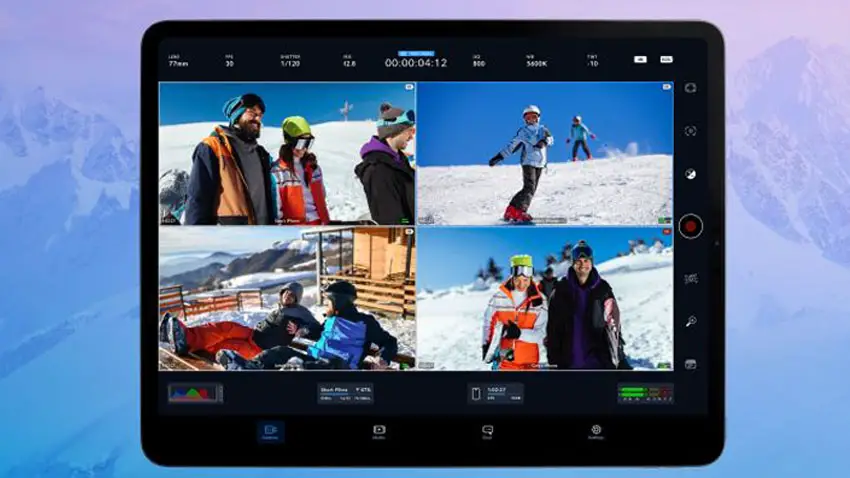
Remote monitoring has revolutionized small-crew and solo-operator productions. When a smartphone is mounted in a tight space—such as a car rig, a gimbal, or an overhead crane—monitoring the shot remotely via a secondary tablet or phone is vital.
Version 3.5 introduces native 10-bit previews during remote monitoring on supported devices.
Technical Distinction: It is critical to note that a 10-bit preview is distinct from a 10-bit recording. The preview pipeline allows the monitoring device to display smoother tonal gradations and prevent banding in high-contrast scenes, assisting the crew in judging exposure accurately. However, the final recorded bit depth of the footage remains strictly tied to the hardware capabilities and encoding limits of the host smartphone camera sensor.
3. Expanding Grading Latitude with Oppo O-Log2
The inclusion of Oppo O-Log2 recording for the Oppo Find X10 and OnePlus 16 series marks a major victory for mobile colorists.

Log profiles intentionally flatten the image, compressing highlights and lifting shadows to capture the maximum dynamic range a sensor can perceive. This prevents clipping in bright skies and preserves detail in shadowy interiors.
While O-Log2 is not a replacement for the sensor output of a dedicated cinema camera, it transforms supported Oppo and OnePlus flagships into capable B-cameras or crash-cams that can be color-matched in post-production. Editors can apply standard Look-Up Tables (LUTs) or manually grade the footage alongside material shot on professional cinema systems, creating a cohesive visual language across multi-camera setups.
4. Thermal Management and Android 17 Optimization
Mobile devices are inherently prone to thermal throttling and rapid battery depletion during high-bitrate video capture.
Blackmagic Camera 3.5 incorporates deep system-level optimizations tailored for Android 17 and the latest flagship chipsets found in the Oppo Find X10 and OnePlus 16 series. By optimizing CPU and GPU workloads during encoding and rendering tasks, the app minimizes thermal spikes. This reduction in power consumption extends active runtimes in the field, reducing the risk of a sudden shutdown mid-take.
Official Responses and Industry Reception
While hardware manufacturers historically focused on automated, AI-enhanced snapshot photography, the professional creator community has consistently pushed for manual, uncompressed workflows.
Representatives from Blackmagic Design have repeatedly emphasized that the goal of the Blackmagic Camera application is to democratize high-end workflows. By bringing professional metadata, timecode synchronization, and cloud uploading pipelines to mobile devices, the company is bridging the gap between consumer electronics and broadcast infrastructure.
Industry reaction to version 3.5 has been overwhelmingly positive. Mobile journalists, documentary filmmakers, and independent content creators have praised the addition of the settings search bar, noting that it drastically speeds up on-set adjustments. Meanwhile, technical reviewers have lauded the integration of Oppo O-Log2, pointing out that expanding manufacturer-specific log support makes mobile devices far more viable as secondary cameras on commercial film sets.
Implications for the Future of Mobile Filmmaking
The release of Blackmagic Camera for Android 3.5 signals a broader shift in how the industry views mobile hardware. Smartphones are no longer viewed merely as compromise cameras used when nothing else is available; they are increasingly integrated into professional, multi-camera production pipelines.
The Rise of the Hybrid Crew
With tools like native 10-bit remote previews and instant preset shortcuts, mobile workflows are beginning to mirror traditional cinema environments. A director can supervise a shot from a tablet while a smartphone acts as a remote-controlled B-cam tucked into a hazardous location.
Post-Production Standardization
As more smartphone manufacturers partner with professional software developers to implement robust log profiles (such as Apple Log, Sony S-Log equivalents, and now Oppo O-Log2), the barriers to mixing mobile footage with traditional cinema camera files continue to fall. Editors no longer have to struggle with over-processed, hyper-saturated mobile video files; instead, they receive flat, flexible log files ready for professional color grading.
Ongoing Hardware Fragmentation Challenges
Despite these software triumphs, the Android ecosystem remains inherently fragmented. Features like native 10-bit previews, O-Log2 recording, and maximum battery efficiency rely heavily on specific hardware configurations, sensor capabilities, and chipset architectures. As seen with version 3.5, optimization must be carefully tailored to individual device families—such as the Oppo Find X10 and OnePlus 16 series—highlighting the ongoing challenge software developers face when supporting an open operating system.
Conclusion
Blackmagic Camera for Android 3.5 is more than a routine bug-fix update. It is a thoughtful, workflow-driven release that directly targets the operational pain points of mobile filmmakers. By cutting down menu navigation times, improving remote monitoring fidelity, expanding log recording capabilities, and tightening power efficiency for Android 17, Blackmagic Design continues to set the benchmark for professional mobile cinematography software.
The update is available now as a free download, inviting creators to test its enhanced capabilities on their next production.
