
A Decade in the Pocket: Image-Line Unleashes FL Studio Mobile 5, Marking the Biggest Overhaul in Ten Years
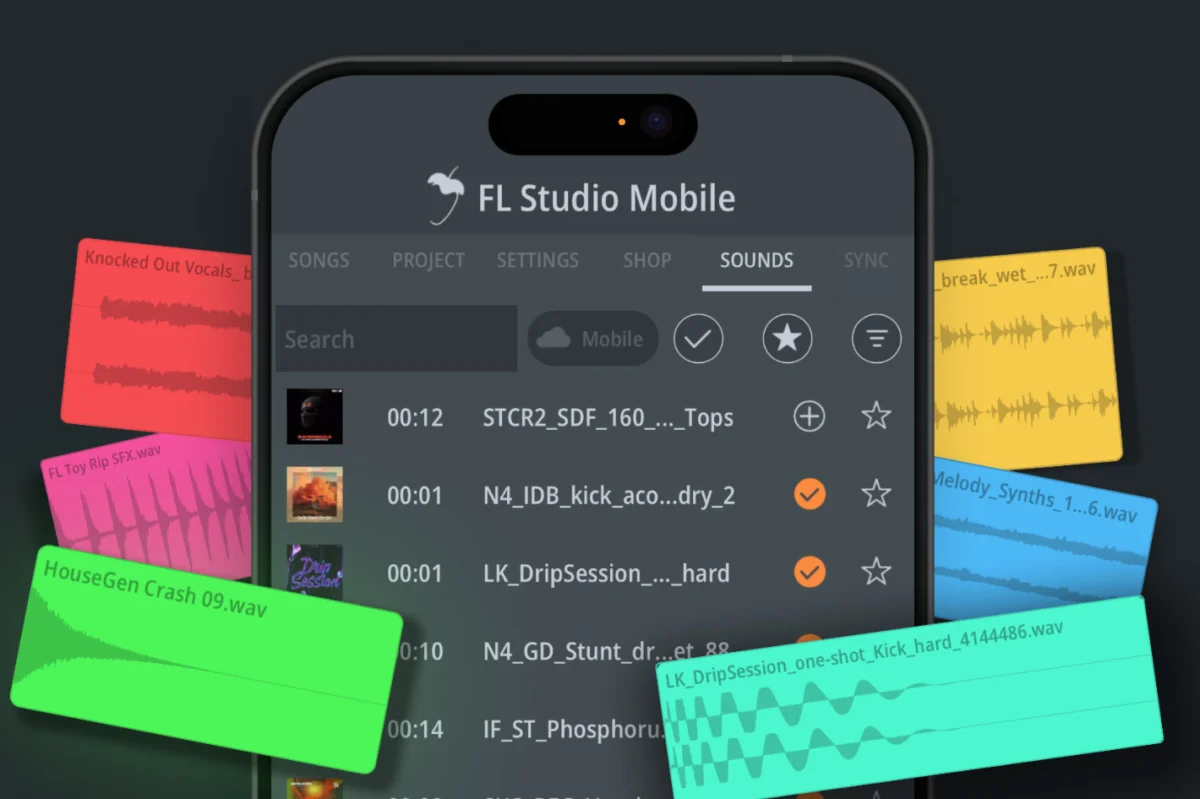
BRUSSELS, BELGIUM — Image-Line, the creative force behind FL Studio—widely recognized as the world’s most popular Digital Audio Workstation (DAW)—has officially announced the release of FL Studio Mobile 5 for iOS and Android devices. Heralded by the company as the most significant update to its mobile application in a decade, version 5 arrives ten years after Image-Line first miniaturized a full-fledged professional music production environment into the palm of a user’s hand.
True to Image-Line’s legendary consumer-first philosophy, this massive generational upgrade is completely free for all existing owners of the app, reinforcing the developer’s decades-long commitment to its "Lifetime Free Updates" policy.
The headline additions to FL Studio Mobile 5 include the seamless integration of FL Cloud Sounds directly into the mobile workflow, the long-awaited implementation of native Portrait Mode, a ground-up redesign of the application’s workspace, and dozens of deep workflow and navigation enhancements tailored for both casual beatmakers and professional producers on the move.
Main Facts at a Glance
- Integration of FL Cloud Sounds: For the first time, the robust sample ecosystem native to the desktop version of FL Studio is accessible directly on mobile devices. Every user receives thousands of free royalty-free sounds instantly via a dedicated "Sounds tab," with zero account creation required.
- Subscription Tiers: While thousands of sounds are entirely free, users who link an active, paid FL Cloud plan unlock the complete desktop-equivalent library containing over two million royalty-free sounds, searchable by genre, tags, and curated collections.
- The Long-Awaited Portrait Mode: Responding to one of the community’s most heavily requested features, FL Studio Mobile now fully supports vertical smartphone operation, allowing users to compose, mix, and arrange music naturally with one hand.
- Redesigned Workspace: Major layout overhauls span the playlist, internal editors, Channel Rack, and transport bar, optimizing screen real estate for modern smartphones and tablets.
- Advanced Workflow Upgrades: The update introduces drag-and-drop functionality from the browser and external applications, enhanced mouse and keyboard support, paste previews, a "Burn Notes to Track" feature, Smart Solo, and a multitude of quality-of-life adjustments.
- Availability: FL Studio Mobile 5 is available immediately on the Apple App Store and Google Play Store. As per company policy, current license holders receive the upgrade at no additional charge.
Chronology: Ten Years of Pocket-Sized Production
To understand the weight of the FL Studio Mobile 5 release, it is essential to trace the trajectory of mobile music production over the past decade.
2014–2015: The Mobile Studio Genesis
Ten years ago, the concept of a "mobile DAW" was largely considered a novelty. While various apps allowed users to sequence basic loops or play software instruments, very few offered a comprehensive environment capable of handling complex multitrack composition, mixing, and audio recording on smartphone hardware. When Image-Line originally launched FL Studio Mobile, it fundamentally shifted expectations. It proved that mobile devices could serve as legitimate scratchpads—and in some cases, primary production hubs—for electronic music producers, hip-hop beatmakers, and sound designers.
The Interim Years: Incremental Refinement
Over the subsequent years, Image-Line continuously updated the mobile application, bridging the feature gap between mobile processors and desktop systems. Updates gradually introduced better AUv3/IAA plugin support, improved audio recording capabilities, expanded internal synth engines (such as Minisynth and DirectWave), and refined the graphical interface to accommodate increasingly diverse screen sizes across Android and iOS ecosystems. However, despite these steady improvements, the core structural framework of the app remained largely tethered to traditional landscape-only studio layouts.
2024–2025: The Cloud Revolution and Version 5
The modern era of FL Studio has been heavily defined by the introduction and expansion of FL Cloud—Image-Line’s integrated online ecosystem for samples, mastering, and distribution launched on the desktop version of the DAW. Recognizing that modern music production is deeply interconnected with cloud-based sample browsing, Image-Line set out to bridge the gap between desktop and mobile environments.
The development of Version 5 represents the culmination of years of engineering aimed at optimizing cloud streaming protocols for mobile bandwidth, reimagining user interfaces for vertical ergonomics, and overhauling core UI components. Released exactly a decade after the initial mobile launch, Version 5 marks a clear dividing line between the early era of mobile sequencing and the modern, connected age of portable music production.
Supporting Data & Technical Architecture
FL Studio Mobile 5 is not merely a cosmetic refresh; it introduces several sophisticated technical frameworks designed to streamline device storage and maximize hardware efficiency.
Intelligent Cloud Streaming and Storage Management
A primary concern when integrating a massive sample library into a mobile application is device storage capacity. Mobile devices, even high-end flagship smartphones, have finite storage compared to desktop computer rigs. To combat this, Image-Line engineered the FL Cloud integration within the mobile app to operate on an on-demand streaming model:
- Instant Previews: The newly designed Sounds tab streams audio previews instantly over an internet connection, ensuring that browsing through thousands of loops, one-shots, and presets consumes zero local storage during the discovery phase.
- Selective High-Resolution Downloads: Audio assets are only downloaded to the local device storage in full, uncompressed resolution when a user explicitly drags or commits a sound into an active project timeline.
- Account Integration & Search Complexity: Users with existing desktop FL Cloud subscriptions can log in via their standard Image-Line credentials. The mobile search engine mirrors the desktop experience, providing granular filters for musical keys, tempos, instrumentation tags, genre categories, and professionally curated stylistic collections without the complication of credit systems or usage meters.
Ergonomics and the Engineering of Portrait Mode
The implementation of Portrait Mode presented distinct layout challenges for Image-Line’s developers. Traditional music software is notoriously horizontal, requiring vast visual width to display multitrack timelines, mixing consoles, and piano roll grids simultaneously.
By restructuring the layout hierarchy, Version 5 allows the app to dynamically reconfigure its interface elements on the fly. Producers can now seamlessly flip their phones between vertical and horizontal orientations, or lock the layout to their preferred mode via the settings menu. This adjustment dramatically lowers the barrier to entry for casual commuting sessions, allowing users to sketch out chord progressions or tweak drum patterns while holding their phone with one hand on public transit.
Workflow and Productivity Enhancements
Beyond the marquee features, Version 5 introduces a laundry list of subtle architectural enhancements designed to accelerate the creative process:
- Workspace Overhaul: The playlist, built-in MIDI and audio editors, Channel Rack, and transport bar have all undergone visual and functional modernizations to reduce menu diving.
- Cross-App Drag and Drop: Users can now drag assets directly from external iOS/Android applications and the system browser straight into FL Studio Mobile projects.
- Advanced Editing Tools: Additions such as Paste Preview, Burn Notes to Track (allowing MIDI data to be rendered directly to audio), and Smart Solo bring desktop-grade micro-editing capabilities directly to mobile workflows.
- Peripherals Support: Enhanced support for external mice and physical QWERTY keyboards transforms tablet and smartphone setups into fully functional micro-workstations.
Official Responses and Industry Perspectives
Constantin Koehncke, CEO of Image-Line, emphasized the cultural and functional significance of the new release during the official product rollout:
"Ten years ago, we put a full music studio in people’s pockets," stated Koehncke. "With Version 5, we’re taking another big step by bringing FL Cloud sounds to mobile. Thousands of sounds are now available for free to every FL Studio Mobile user, making it easier than ever to get started and make music wherever you are. And with portrait mode, one of our most requested features, we’re delivering something our community has been asking for for a long time."
Industry analysts and early-access beta testers have echoed Koehncke’s sentiments, noting that the democratization of high-end sample libraries on mobile platforms represents a major shift in how modern tracks are initiated. Rather than waiting until they return to a home studio setup, producers can now capture spontaneous ideas with professional-grade sonic palettes immediately accessible at their fingertips.
Furthermore, Image-Line’s steadfast adherence to its Lifetime Free Updates model continues to earn high praise across the music technology sector. In an era where software subscription models have become standard practice across nearly every major digital audio workstation developer, Image-Line’s continued delivery of monumental, generational updates at no extra cost to existing license holders stands as a rare and fiercely loyal consumer advocacy model.
Implications for the Future of Mobile Music Production
The release of FL Studio Mobile 5 carries profound implications for the broader landscape of music technology and electronic music culture.
1. The Blurring Lines Between Mobile and Desktop Production
Historically, mobile DAWs were viewed as secondary sketchpads—useful for capturing rough song ideas that would later be exported, heavily reworked, and finished on a powerful desktop computer. With the integration of FL Cloud’s multi-million sound library, high-end synthesisers, and advanced editing features like Burn Notes to Track, the friction between mobile and desktop environments is rapidly dissolving. Producers can start a project on a smartphone during a morning commute, refine the arrangement on a tablet during a flight, and finalize the mix on a desktop DAW with near-zero compatibility hurdles.
2. Lowering the Barrier to Entry for Next-Generation Creators
By offering thousands of royalty-free sounds completely free of charge and removing the barrier of forced account creation for casual users, Image-Line has effectively supercharged its onboarding funnel. Aspiring producers no longer need an expensive computer, audio interface, or paid sample subscription to start crafting professional-sounding tracks. A smartphone—an item already owned by billions of people globally—is now a fully functional, high-fidelity production studio.
3. Setting a New Standard for Software Lifecycle Support
Image-Line’s continued profitability under the Lifetime Free Updates model challenges the conventional wisdom of the modern software industry. While competitors rely on yearly upgrade fees or mandatory subscription tolls to fund ongoing development, Image-Line demonstrates that long-term brand loyalty, massive community goodwill, and sustained software adoption can drive thriving business ecosystems. FL Studio Mobile 5 proves that software manufacturers can invest heavily in major, decade-defining overhauls without passing the financial burden directly back onto their existing user base.
Conclusion
FL Studio Mobile 5 is available for download right now across the Apple App Store and Google Play Store. For millions of existing producers worldwide, it represents not just a software update, but a renewed invitation to make music anywhere, anytime, with the full backing of one of the industry’s most robust audio ecosystems.
