
Beyond the Jaggies: Mastering Anti-Aliasing for Action Camera Cinematography
In the fast-paced world of digital cinematography, action cameras—such as those produced by GoPro, DJI, and Insta360—have revolutionized how we capture high-octane content. From professional sports broadcasts to high-altitude drone photography, these compact powerhouses offer incredible versatility. However, beneath the 4K resolution and wide-angle allure lies a persistent technical hurdle: aliasing.
For creators looking to refine their footage and elevate the visual quality of their projects, understanding how to mitigate these digital artifacts is essential. This guide explores the mechanics of aliasing, the evolution of post-production solutions, and how the free FXAA plugin for Adobe After Effects has become a cornerstone tool for modern editors.
Main Facts: The Anatomy of Aliasing
Aliasing, often referred to by editors as "stair-stepping" or "shimmering," is a visual distortion artifact. It manifests as jagged, pixelated edges along diagonal lines or high-contrast textures. In video production, it occurs when a digital sensor fails to sample high-frequency information correctly. Because action cameras rely on tiny sensors to maintain their small form factor, they often struggle to interpret fine details, leading to these artifacts.
The problem is compounded by two primary factors:

- Sensor Limitations: The physical size of the sensor dictates its ability to resolve detail. When the sensor’s grid cannot match the density of the light patterns hitting it, the resulting image "aliases."
- Over-Sharpening: To make up for the inherent softness of small sensors, most action camera manufacturers bake aggressive sharpening algorithms into their firmware. This artificial sharpening amplifies the jagged edges, turning subtle sampling errors into glaring, distracting artifacts.
Chronology: The Evolution of Post-Production Fixes
The history of fixing aliasing in post-production has been a progression from crude, global adjustments to sophisticated, intelligent algorithms.
The "Global Blur" Era
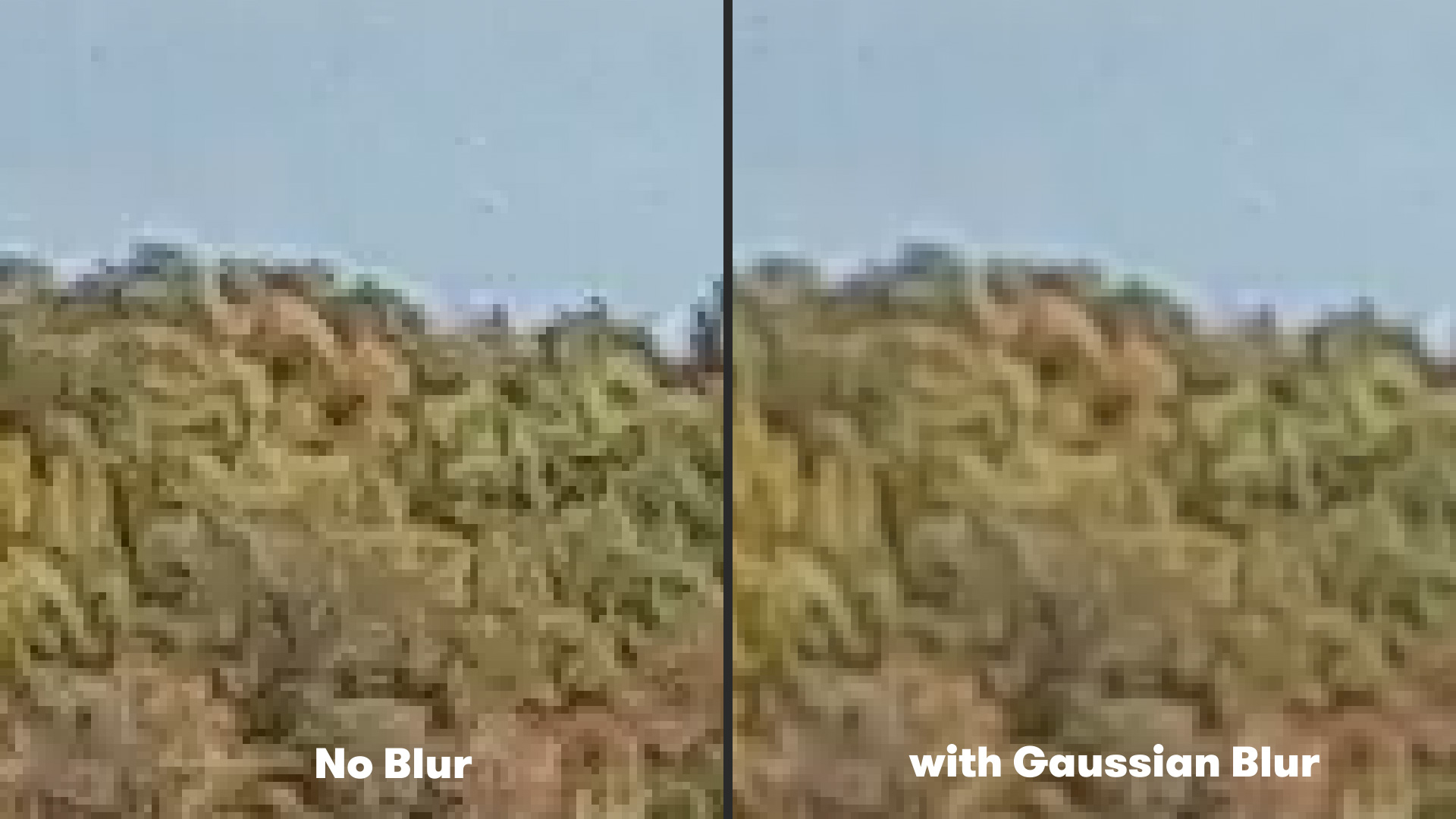
For years, the industry standard for reducing aliasing was the use of a subtle, uniform Gaussian Blur. By applying a blur across the entire frame, editors could soften the jagged edges of high-contrast areas. While effective, this method was inherently destructive. Because the blur was applied globally, it sacrificed the sharpness of the entire image, resulting in a loss of fine detail in areas that didn’t require correction. Editors were forced to choose between "stair-stepped" artifacts and a soft, mushy image.
The Algorithmic Shift
As computing power increased, the shift moved toward edge-detection-based filtering. Instead of blurring the entire frame, software began to identify specific pixel transitions—the edges—and apply smoothing only to those regions. This allowed for the preservation of fine details in textures like skin, fabric, or foliage, while specifically targeting the "jagged" areas that cause visual fatigue.
Supporting Data: Why FXAA Is the New Standard
Fast Approximate Anti-Aliasing (FXAA) represents the current apex of accessible post-production correction. Developed as a real-time post-processing technique for the gaming industry, it has been successfully adapted for film and video workflows via the free plugin from Plugin Everything.
How FXAA Works
Unlike traditional blurs that operate on the entire image data, FXAA employs an edge-detection algorithm. It scans the frame for high-contrast boundaries—the classic "stair-step" locations—and applies a local smoothing filter only to those pixels.
Efficiency Metrics:
- Rendering Speed: Because FXAA is an approximation algorithm, it is computationally inexpensive. Unlike complex noise reduction plugins that can add hours to a render, FXAA operates in near real-time.
- Minimal Loss: Because it is localized, the "General Sharpness" of the footage remains largely intact.
- Stackability: In extreme cases, where footage is heavily compromised by compression, users can stack multiple instances of the FXAA effect to achieve a higher degree of smoothing without the catastrophic detail loss associated with a heavy Gaussian Blur.
Official Responses and Industry Best Practices
Leading colorists and VFX artists generally agree that while post-production tools like FXAA are powerful, they are not a replacement for proper in-camera settings.
The industry consensus for high-end action camera capture is as follows:
- Lower the In-Camera Sharpening: Almost every professional action camera allows the user to turn off or reduce the "Sharpness" setting. By setting this to "Low" or "Off," the camera captures a more natural, albeit softer, image. This provides a cleaner canvas for post-production sharpening, which is infinitely more controllable than the camera’s internal processing.
- Manage Compression: Action cameras use aggressive H.264 or H.265 compression. Aliasing is often exacerbated by compression artifacts, which "break" the edges of objects. Shooting at the highest possible bit rate available on the device is the most effective way to prevent aliasing from becoming "baked in."
- Use ND Filters: Aliasing is often worsened by high shutter speeds. By using Neutral Density (ND) filters to keep shutter speeds low (ideally double the frame rate), motion blur is captured naturally, which serves as a natural anti-aliasing filter for the footage.
Implications: The Future of Action Cinematography
The availability of tools like FXAA has significant implications for indie filmmakers. In the past, achieving a "cinematic" look with an action camera was difficult due to the clinical, sharp, and jagged appearance of the footage. By mastering the anti-aliasing workflow, creators can now take footage from a $300 action camera and elevate it to a level that blends more seamlessly with professional cinema cameras.
The Workflow Pipeline
For those looking to integrate these techniques into their daily workflow, the process is straightforward:
- Import: Bring your high-bitrate action camera footage into After Effects.
- Analysis: Observe the footage for "shimmering" or "stair-stepping."
- Application: Navigate to Effect > Plugin Everything > FXAA.
- Adjustment: If the default setting is too aggressive or insufficient, stack the effect or adjust the plugin’s internal thresholds.
- Refinement: Apply a very light "Unsharp Mask" at the end of the chain if the image feels too soft. This "blur-then-sharpen" sandwich often results in a more organic, film-like texture than leaving the raw, over-sharpened action camera footage untouched.
Beyond Anti-Aliasing
It is important to remember that anti-aliasing is only one piece of the puzzle. Improving action camera footage often requires a multi-pronged approach. Stabilizing shaky handheld shots using tools like ReelSteady GO or the native Gyroflow is equally vital to achieving professional results. When you combine stabilization with proper anti-aliasing techniques, the difference in perceived production value is massive.
Final Thoughts
The "Action Camera Look" doesn’t have to be synonymous with digital harshness. By understanding the physics of the sensor and utilizing modern, intelligent software solutions, creators can harness the portability of these cameras without sacrificing image quality. As technology continues to evolve, the barrier between "prosumer" gear and professional-grade output continues to thin—provided you know how to polish the edges of your work.
Whether you are filming mountain biking, aerial drone shots, or vlogging, the ability to control the "sharpness" and "smoothness" of your pixels is what separates a amateur project from a professional production. Download the FXAA plugin, experiment with your camera’s internal settings, and take control of your image fidelity today.
