
The Filmmaker’s Storage Dilemma: How DriveShelf Solves the Offline Archive Problem
Main Facts: Taming the Physical Storage Jungle
In the modern digital landscape, the phrase "capacity is king" has dictated the workflow of creative professionals for decades. However, as high-end cinema cameras routinely shoot in blistering 4K, 6K, and 8K RAW formats, filmmakers face a secondary crisis that raw terabytes cannot solve: the organizational labyrinth of physical archives.
When a production wraps, the workflow shifts. High-speed working drives are offloaded, backups are verified, and the master SSDs or external hard drives are pulled, labeled, and placed neatly onto a shelf or tucked into a Pelican case. Months or even years later, when a client requests a revision, a director wants to pull archival B-roll, or an editor needs a forgotten audio stem, the real headache begins.
Enter DriveShelf, a streamlined macOS utility developed by Bangkok-based director and cinematographer Sergiy Pudich. Designed specifically to bridge the gap between active editing environments and dormant physical archives, DriveShelf addresses a singular, frustrating question that plagues independent creators and production houses alike: Which drive actually contains the file I need?
Rather than forcing users to keep every legacy drive plugged into a hub or workstation, DriveShelf indexes connected storage devices—logging filenames, directory paths, file sizes, and creation dates. Once a drive is cataloged, it can be safely disconnected and returned to its physical resting place. Its contents, however, remain fully searchable through the application.
Pudich originally built the utility out of personal necessity to manage his own swelling collection of production drives before packaging it into a commercial product via Easyfilm. Available on the Mac App Store for a flat fee of $14.99 with no recurring subscription fees, DriveShelf has quickly carved out a niche as an indispensable tool for content creators drowning in fragmented storage media.
Chronology and Evolution: From Personal Workaround to Ecosystem
The trajectory of DriveShelf reflects a common software development pattern: a practitioner encounters a persistent pain point, builds a rudimentary tool to solve it, and gradually expands its feature set based on real-world application.
The Inception
In its earliest iterations, DriveShelf was born from Pudich’s daily frustrations on set and in the edit suite. Managing dozens of disparate SSDs from commercial shoots, documentary projects, and narrative films meant wasting countless billable hours mounting and unmounting drives just to track down stray project assets. The core premise was simple: read the directory structure once, save it locally, and let the user search the metadata without needing the physical hardware present.
Version 1.9 and the Desktop Expansion
As the utility gained traction among early adopters in the independent filmmaking community, user feedback highlighted a glaring oversight in the initial design: not all assets live on external media. Often, active project files, scratch disks, or local exports reside directly on a workstation’s internal SSD, while older assets sit on external shelves.
To address this, Pudich released Version 1.9, introducing the "Add This Mac" feature. This crucial update expanded DriveShelf’s jurisdiction, allowing users to index their Mac’s Home folder right alongside their external RAID enclosures and portable Samsung T5/T7 SSDs. The local machine now appears as a dedicated entry within the software’s ecosystem, enabling simultaneous searches across both workstation storage and offline archives.
The Mobile Pivot
Recognizing that filmmakers are rarely tethered to their desks, the development cycle soon expanded beyond macOS. By pairing the desktop utility with an iPhone companion app—synchronized securely via the user’s personal iCloud account—DriveShelf transitioned from a desktop-bound ledger into a mobile-accessible archive index. Today, a cinematographer standing on a remote location scouting shoot locations can answer a producer’s frantic query about legacy footage straight from their smartphone, completely bypassing the need to dial back to the studio.
Supporting Data, Features, and Technical Architecture
To understand how DriveShelf operates within a professional pipeline, it is necessary to examine its underpinnings, technical limitations, and operational workflow.
Core Indexing and Search Capabilities
DriveShelf is intentionally lightweight. It does not act as a traditional Media Asset Management (MAM) system or a Digital Asset Management (DAM) platform. It does not transcode footage, generate proxies, or move files around on your hard drives. Instead, it focuses exclusively on metadata indexing.
- Granular Filtering: Users can narrow down search results using multiple parameters, including specific file types, file sizes, designated drives, or custom-created drive groups.
- Finder-Style Column View: For those who prefer browsing a directory manually rather than running keyword searches, DriveShelf mirrors the familiar macOS column view, allowing users to traverse the folder hierarchy of an offline drive as if it were plugged directly into their Thunderbolt port.
- Hardware UUID Recognition: One of the most practical quality-of-life features is how the app identifies storage media. DriveShelf maps drives to their underlying hardware UUID rather than their user-assigned desktop names. If a user renames an SSD from "Shoot_A_Backup" to "Archive_2024," the application maintains its historical link without missing a beat.
The Duplicate Finder
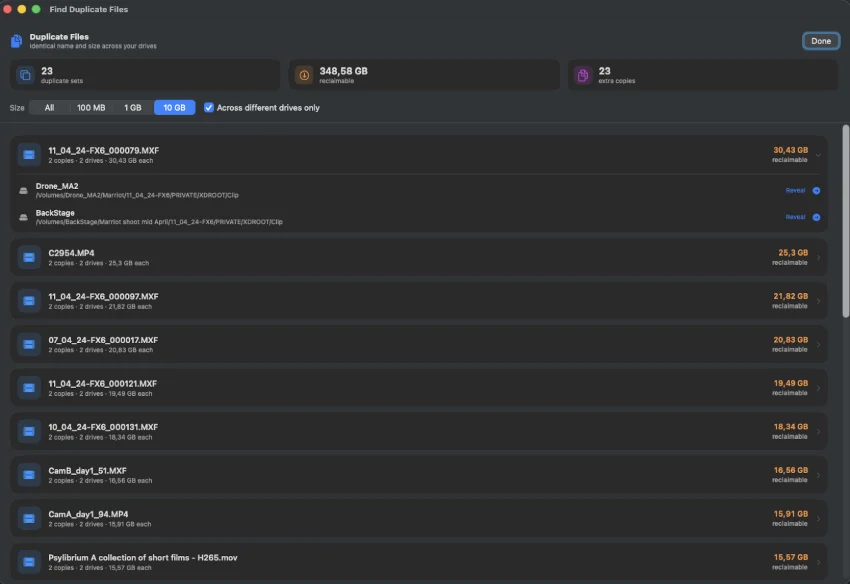
As archives age, redundancy naturally sets in. Editors often copy project folders across multiple drives for safety during fast-paced turnarounds, resulting in gigabytes—if not terabytes—of wasted space.
DriveShelf includes a cross-drive duplicate finder that flags files sharing identical names and sizes across different cataloged volumes.

- The Technical Caveat: It is vital to note that DriveShelf’s duplicate detection is based strictly on filename and file size, rather than a cryptographic hash or checksum (such as MD5 or xxHash). Therefore, the software identifies potential duplicates rather than guaranteeing byte-for-byte identity. Nevertheless, for a filmmaker trying to gauge how much redundant material is bloating their physical shelf space, it serves as an invaluable diagnostic overview.
Ecosystem Specifications and Pricing
- Pricing Model: A one-time purchase of $14.99 (US App Store, with regional adjustments) granting unlimited drive cataloging.
- macOS Requirements: Requires macOS 14.0 or later and is fully optimized for both Apple Silicon (M-series) and Intel architectures.
- iOS Requirements: The iPhone companion app requires iOS 26.5 or later.
- Privacy & Cloud Usage: The primary catalog database resides entirely locally on the user’s Mac. DriveShelf does not upload catalog data to third-party servers; iCloud is utilized exclusively for synchronizing the index between the user’s local Mac and their personal iOS device.
Official Responses and Developer Philosophy
Throughout the development of DriveShelf, Sergiy Pudich has maintained a transparent, pragmatic stance regarding what the software is—and more importantly, what it is not.
In various technical breakdowns and user discussions, Pudich has repeatedly emphasized that DriveShelf is explicitly not a backup solution.
"DriveShelf is designed to solve a visibility problem, not a safety problem," industry analysts note regarding the software’s architectural limits. "It remembers where files live, but it offers zero defense against hardware failure, bit rot, or accidental deletion."
For professional production environments, Pudich strongly advocates that DriveShelf must sit alongside established, rigorous data protection pipelines rather than replace them. The software makes no attempt to subvert the industry-standard 3-2-1 backup strategy (three copies of data, across two different media types, with one offsite copy). Critical camera originals and master project assets still demand dedicated hardware redundancy, verified checksum offloads (using software like Silverstack or ShotPut Pro), and physical security.
Furthermore, DriveShelf maintains strict boundaries regarding network-attached storage (NAS). The utility is engineered entirely around local Mac storage and physically removable media. Official, native support for complex network shares or enterprise-grade NAS environments is intentionally omitted, keeping the application fast, lean, and laser-focused on the individual creator’s physical media shelf.
Implications for the Modern Filmmaker
The release and steady refinement of utilities like DriveShelf point to a broader evolution in how independent content creators manage the byproduct of their work: data accumulation.
The Declining Cost of Media vs. The Rising Cost of Time
Storage media has never been cheaper per gigabyte. High-capacity portable SSDs and desktop hard drives are more accessible than ever. Consequently, filmmakers rarely delete raw footage; they simply buy another drive, offload, and archive.
This accumulation creates a hidden tax on productivity. When an editor spends two hours hunting down a specific audio mix from a project shot three years ago, the financial cost of that wasted time far exceeds the $14.99 price tag of a cataloging utility. By transforming an abstract stack of unlabeled metal rectangles into a searchable, indexed database accessible from an iPhone while on the go, DriveShelf directly targets and eliminates this productivity bottleneck.
The Rise of the Lean Creator Economy
As video production democratizes further—empowering solo creators, lean documentary crews, and boutique digital agencies—the overhead of enterprise-level Digital Asset Management (DAM) systems becomes prohibitive. Full-scale MAM suites often require dedicated servers, complex SQL databases, steep learning curves, and recurring subscription fees that make sense for Hollywood studios, but are wildly impractical for a freelance cinematographer working out of a home office.
DriveShelf hits a sweet spot in the software ecosystem: it provides a specialized, single-purpose tool that respects the user’s budget, hardware limitations, and privacy. By refusing to bloat into an all-encompassing media manager, it remains fast, reliable, and frictionless.
Final Thoughts
The best tools in a creative professional’s arsenal are often those that get out of the way and solve one annoying problem with absolute precision.
DriveShelf does not revolutionize video editing. It does not color-grade your footage, generate AI transcripts, or render your timelines faster. What it does do is answer the most tedious question in post-production logistics without making you break a sweat: Where did I put that file?
For independent filmmakers, directors, cinematographers, and editors who have watched their office shelves slowly transform into graveyards of disconnected hard drives and SSDs, DriveShelf offers an elegantly simple, subscription-free lifeline. It respects your privacy, honors your existing backup workflows, and ensures that your physical archive remains as accessible as your desktop search bar—whether you are sitting at your editing suite or checking your phone from a coffee shop halfway across the world.
